

5 workflows every service business should automate (and what to use)
Most service businesses run on a weird combination of sticky notes, group texts, and someone remembering to do something before they go home. It works until it doesn't. A lead comes in on a Saturday and nobody follows up until Monday. An invoice sits in a "to send" pile for a week. A five-star job never turns into a five-star review because nobody asked.
These aren't technology problems. They're timing problems. The work itself is simple. It just needs to happen at the right moment, every time, without someone manually triggering it. That's what business workflow automation does for service companies: it handles the predictable stuff so your team can focus on the work that pays.
We build custom automations for service businesses, and these five workflows come up in almost every conversation. They're where the money leaks out.
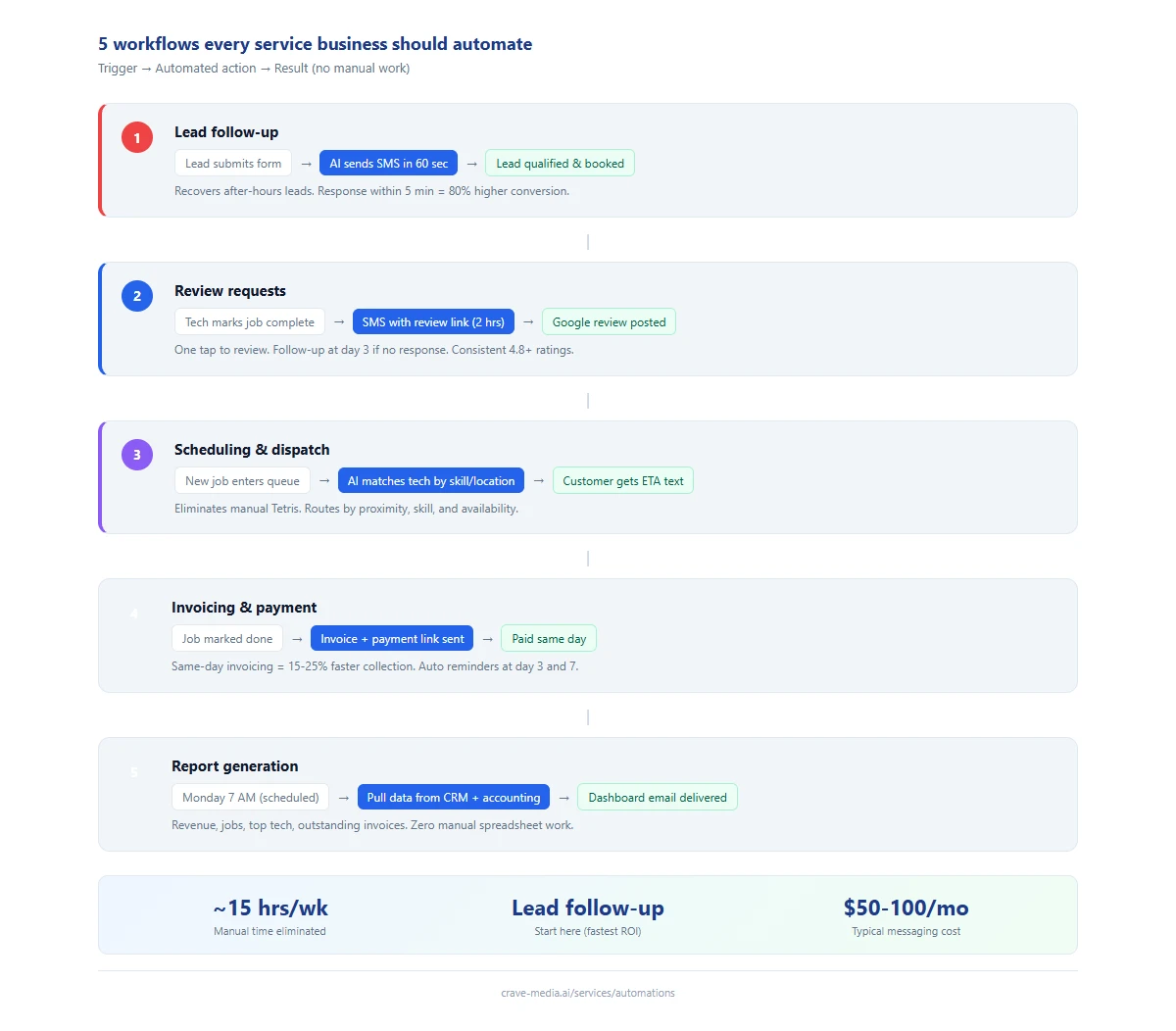
Five service business workflows that run on autopilot: from lead follow-up to weekly reporting, each one fires on a trigger and completes without manual work. Download as PDF
View interactive version
Lead follow-up
This is the big one. A lead fills out your contact form or texts your business number. If nobody responds within five minutes, your odds of converting that lead drop by about 80%. After 30 minutes, you're basically done.
Most service businesses have someone checking form submissions a few times a day. If the lead came in at 9 PM, it sits until morning. By then, the homeowner already called somebody else.
An automated lead follow-up system sends a text within 60 seconds of the submission. Something like:
"Hey Sarah, thanks for reaching out to Memphis Pro Plumbing. Sounds like you've got a leak under the kitchen sink. I have a tech available tomorrow morning between 8-10 AM. Would that work for you?"
The system pulls the customer's name and problem description from the form, qualifies the lead based on job type, and either books it directly or routes it to a dispatcher. If the customer doesn't respond, it follows up once more the next morning. No one on your team touched anything.
We wrote a full walkthrough of how this works for after-hours leads if you want the detailed version. The short version: this single automation recovers more lost revenue than any other.
What the setup requires
A web form or texting number that feeds into your CRM. An AI layer that reads the submission, classifies the job type, and generates a personalized response. An SMS platform (Twilio or similar) to send the messages. Most setups run about $50-100/month in messaging costs for a company handling 200-400 leads per month.
Who this is for
If you're getting more than 10 leads a week and anyone on your team has ever said "I forgot to call them back," this is where you start.
Review requests
You finished the job. The customer is happy. They even said "I'll leave you a review." They won't. Not because they don't mean it, but because they'll get home, make dinner, and forget.
The companies with 300+ Google reviews aren't better at their jobs than the ones with 40. They just ask at the right time, in the right way, consistently.
An automated review request goes out two hours after the job is marked complete. It's a text message with a direct link to your Google review page. One tap, they're writing a review. No app to download, no email to dig through. We covered the full review request flow for carpet cleaning companies, and the system works the same way for plumbers, roofers, and HVAC techs.
What a review request looks like
"Hi David, thanks for letting us handle your AC repair today. If you've got 30 seconds, a Google review helps us out a lot: [link]. Thanks! - Mike at Comfort Air"
That's it. Short, personal, includes the tech's name. Sent at 4 PM, not 10 PM. If they don't respond, one gentle follow-up three days later. After that, drop it.
The pieces you need
A way to mark jobs complete (most field service software handles this, or a simple checklist app). A connection between your job management system and an SMS platform. A direct link to your Google Business profile review page. The automation itself takes a few hours to build and basically zero maintenance.
Is it worth it?
Always. Even if you're a one-truck operation. The only businesses that don't benefit from this are the ones already asking every single customer and following through every time. That's almost nobody.
Scheduling and dispatch
Your office manager spends two hours every morning playing Tetris with the schedule. Which tech is closest to the 9 AM job? Who's qualified for the commercial work in Germantown? Did Carlos already tell that customer he'd be there by 10?
For a three-truck operation, this is manageable. It's annoying, but manageable. At six trucks, it's a full-time job. At ten, mistakes start costing real money: double-bookings, 45-minute drive times between jobs that should have been 15, and your best tech stuck on a job any apprentice could handle.
Automated scheduling pulls from your job queue, checks tech availability and location, matches skill requirements, and builds the day's route. When a new job comes in mid-day, it recalculates. When a job runs long, it shifts downstream appointments and texts affected customers automatically.
What it looks like in practice
A new AC repair request comes in at 11 AM. The system checks: Jason is finishing a job in Bartlett and will be free by noon. The Bartlett job is four miles from the new request. Jason is certified for AC work. The system slots the job, sends Jason the details, and texts the customer: "Jason can be there between 12:30-1:00 PM today."
Your office manager didn't make a phone call.
What it runs on
A digital job management system (ServiceTitan, Housecall Pro, Jobber, or even a well-organized spreadsheet as a starting point). GPS/location data from your techs (most phones handle this). Tech skill profiles. The AI layer sits on top of your existing system and handles the routing logic.
When it's worth building
When your dispatcher is spending more than an hour a day on scheduling, or when you're running more than four techs. Below that, a whiteboard and a phone call is honestly fine.
Invoicing and payment collection
A completed job is only revenue when the invoice gets sent and paid. For a lot of service businesses, there's a gap between "job done" and "invoice sent" that ranges from a few hours to a few weeks. Every day that gap stays open, your odds of collecting drop.
Automated invoicing triggers when the tech marks a job complete. The system generates the invoice from the job details (labor hours, parts used, service type), sends it to the customer via text or email, and includes a one-tap payment link. If the customer doesn't pay within three days, a reminder goes out. Then another at seven days. Then it flags the account for your office to follow up personally.
What a payment text looks like
"Hi Sarah, here's your invoice for today's drain clearing: $185. Pay securely here: [link]. Thanks for choosing Memphis Pro Plumbing!"
That message goes out 30 minutes after the tech marks the job done. The customer is still thinking about the work. They still have their phone in their hand. Collection rates for same-day invoicing run 15-25% higher than next-day.
What goes into it
A payment processor (Stripe, Square, or whatever your field service software uses). A connection to your job tracking system so invoices generate automatically. Templates for different job types so pricing is consistent. The automation handles the rest.
The threshold
If you're sending more than 10 invoices a week manually, or if your average time from job completion to invoice sent is more than 24 hours. Also worth it if you're spending time chasing late payments that a reminder sequence could handle.
Report generation
Nobody automates this one first, but everyone wishes they had. Your accountant asks for a monthly revenue breakdown by job type. Your insurance company wants a safety incident log. You want to know which tech generates the most revenue per day. You want to see seasonal trends so you can plan hiring.
Most service companies pull this data manually. Someone exports a spreadsheet, sorts it, builds a chart, and emails it to the owner. That takes two to four hours per report. And it happens once a month at best, which means you're always looking at stale data.
Automated reporting pulls from your job management and accounting systems and generates reports on a schedule. Monday morning, you get a dashboard email with last week's numbers: total revenue, jobs completed, average ticket size, top-performing tech, outstanding invoices. End of month, you get the full breakdown. No one built a spreadsheet.
What a weekly summary looks like
A Monday morning email hits your inbox at 7 AM:
Last week: May 1-7
- 47 jobs completed ($14,200 revenue)
- Average ticket: $302
- Top tech: Mike ($4,100 across 12 jobs)
- 6 outstanding invoices ($1,850 total)
- 4 new Google reviews (4.8 avg rating)
That took zero human effort to produce. The same data would take your office manager 90 minutes to compile manually.
How it connects
Your job management system and your accounting system need to be accessible via API (most modern ones are). A reporting layer that pulls the data, calculates metrics, and formats the output. An email or Slack integration to deliver it. This is one of the more complex automations to build up front, but one of the cheapest to maintain.
When you need it
When you're making decisions based on gut feeling instead of data, or when pulling a report takes long enough that you avoid doing it. If your team is five people or more, the time savings alone justify it.
Where to start
You don't automate all five at once. Start with the one that's costing you the most money right now. For most service businesses, that's lead follow-up. It has the fastest payback because you're recovering revenue you're already losing.
After that, review requests. Then scheduling when your team grows past the point where manual dispatch works. Invoicing and reporting can layer in anytime.
None of these workflows require someone to think. They require someone to remember. Automation is good at remembering. Your team is good at thinking. Let each one do what it's good at.

About the author
Zac Spencer is an online marketing specialist and the owner of Crave Media, based in Salt Lake City, Utah. Since 2013 he has managed hundreds of Google Ads accounts across dozens of industries — with budgets from a few hundred dollars to $250K a month — and founded Crave AI to build custom AI tools and automations for local service businesses.