

What AI-powered dispatching could look like for a plumbing company
A pipe bursts at 11 PM on a Wednesday. The homeowner's kitchen is flooding. They search "emergency plumber near me," find your number, and submit a form on your website. What happens next decides whether you get the job or your competitor does.
For most plumbing companies, what happens next is an answering service takes a message and promises someone will call back. Or worse, it goes to voicemail. Meanwhile the homeowner calls the next number on the list. Half of all plumbing inquiries come outside business hours, and in the emergency plumbing world, the first company to respond wins that call almost every time.
AI dispatching for a plumbing company changes that equation. Instead of relying on whoever's phone rings first, the system handles intake, qualifies the emergency, figures out which tech is closest and available, and dispatches them before you pick up your phone.
We'd build this as a dispatch dashboard that gives you a live view of your team, active jobs, the emergency queue, and response time metrics. This post walks through what it would look like and how it would run on a typical busy evening.
How the dispatch system works
The system we'd design for a plumbing company does three things: prioritizes incoming work by urgency, matches jobs to the right technician, and tracks response times so you know whether your operation is getting faster or slower.
When a call, form submission, or text message comes in, the AI scores the urgency. A burst pipe under a kitchen sink gets flagged as a critical emergency. A slow drain in a guest bathroom gets tagged as routine. A water heater making strange noises lands somewhere in between. The scoring looks at keywords in the customer's description, time of day, and whether photos were attached.
Once the system knows the priority level, it checks your technician board. Who's on call tonight? Who just finished a job three miles away? Who has the right experience for this type of repair? The AI routes the job to the best available tech based on proximity, current workload, and skill match.
The tech gets a push notification with the job details: customer name, address, problem description, any photos the customer uploaded, and the priority level. The customer simultaneously gets an automated text confirming their request was received and providing an estimated arrival window.
No one in your office touched anything. Your dispatcher didn't wake up. The whole handoff happened in under a minute.
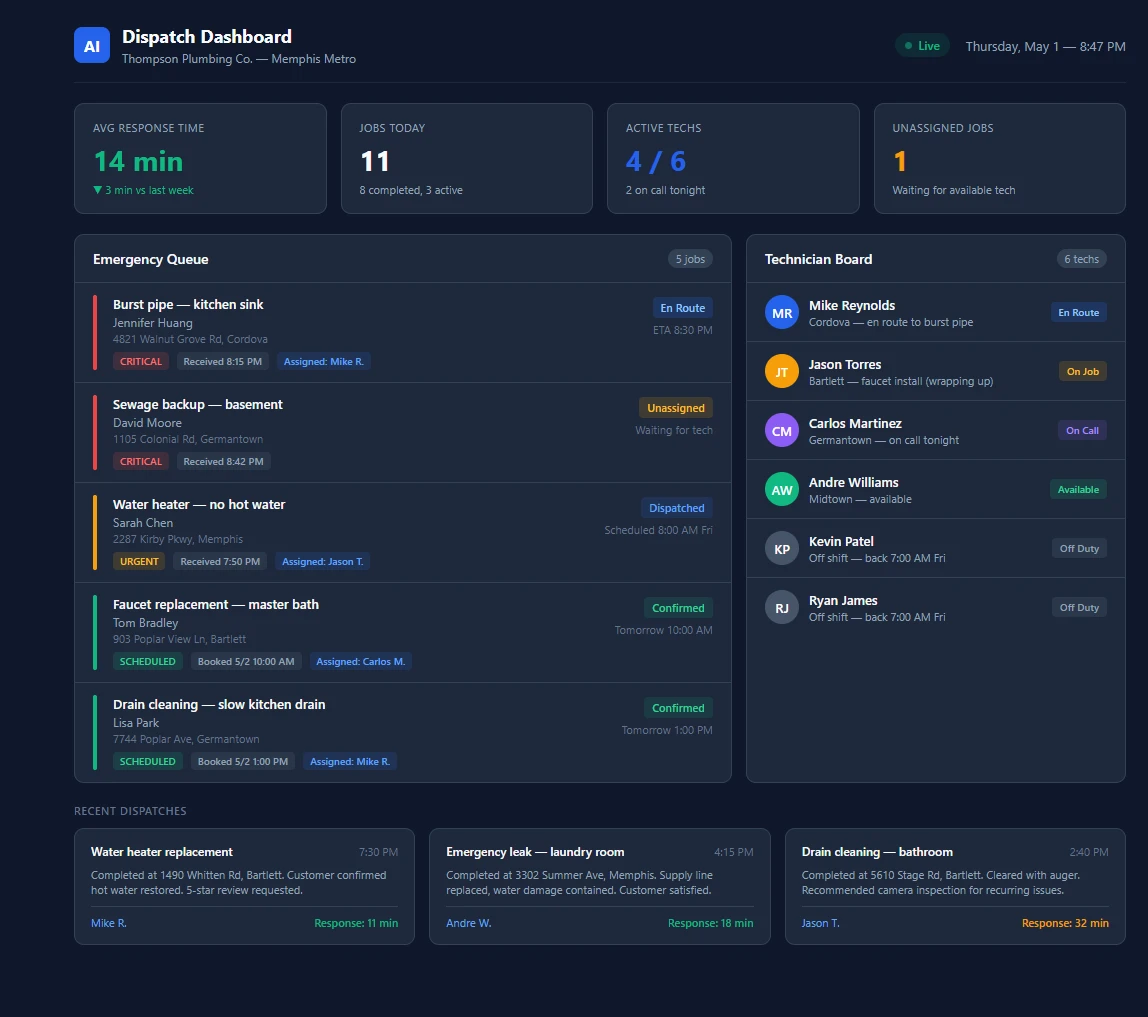
An AI dispatch dashboard designed for plumbing companies, showing the emergency job queue with color-coded priority levels, real-time technician status, and response time tracking across the Memphis metro service area. Download as PDF
View interactive version
A Thursday night with the system running
Your on-call tech, Mike, finishes a water heater replacement in Bartlett around 7:30 PM. He marks the job complete on his phone and starts driving home. The dashboard updates his status to available.
At 8:15 PM, an emergency form comes in from a homeowner in Cordova. Water is pooling under the kitchen sink and dripping through to the basement. The AI classifies it as a critical emergency and checks the tech board. Mike is 12 minutes away. Your other on-call tech, Carlos, is in Germantown and 22 minutes out.
Mike gets the dispatch notification before the homeowner has finished wiping up water. He sees the address, the problem description, and a photo the homeowner attached showing water on the floor. He taps to confirm. The customer gets a text: "Mike is on his way. Estimated arrival 8:30 PM."
At 8:42 PM, another emergency comes in. Sewage backup in a Germantown basement. The system tags it critical but Mike is already en route to Cordova. Carlos gets the dispatch. When Jason finishes his faucet install in Bartlett, the system automatically routes a next-morning water heater call to him and sends the customer an 8 AM confirmation.
By morning, you open the dashboard and see all three after-hours requests handled, customers confirmed, and average emergency response time sitting at 14 minutes for the week. None of it required a phone call from your office.
What the dashboard tracks
The dispatch dashboard we'd design for a plumbing operation with three to fifteen technicians breaks down into a few key views.
The emergency queue shows incoming jobs sorted by priority. Red tags for active leaks, burst pipes, and sewage backups. Yellow for urgent issues like water heater failures or no-hot-water calls that need same-day attention. Green for scheduled maintenance and routine work. Each card shows customer details, how long since the request came in, and which tech has been assigned.
The technician board shows your team in real time. Who's on a job, who's available, who's off duty, who's on call for the night. Each card shows their general location, their current job if they're working, and how many jobs they've completed today.
The metrics bar across the top tracks what matters for a plumbing dispatch operation: average emergency response time, jobs completed per day, active techs on duty, and unassigned jobs waiting for a tech. Over weeks and months, these numbers show you whether response times are tightening or slipping.
Recent dispatch history at the bottom gives you a quick look at how the last few jobs went, including response times and completion notes. If you want to audit how the team handled Saturday night's emergency calls, it's all there.
How it connects to your current setup
The first question plumbing company owners ask is whether this replaces their existing software. It doesn't. The dispatch system sits on top of whatever you're already running.
If you use ServiceTitan, Jobber, or Housecall Pro, the integration syncs your job data, tech schedules, and customer records. When the AI dispatches a job, it creates the record in your existing system. When a tech updates a status, both systems reflect it.
If you're running things through spreadsheets and phone calls, which is common for plumbing operations under ten employees, the system works on its own with a simple web dashboard your techs access from their phones.
The AI doesn't replace your dispatcher or office manager. It handles the volume that comes in when they're not at their desk: evenings, weekends, holidays, and the calls that come in at 3 AM. During business hours, your team uses the dashboard as a scheduling and routing tool while the AI handles suggestions and overflow.
This same type of workflow automation looks different depending on the industry. For landscaping companies, it tracks proposals through a longer decision cycle. For carpet cleaning businesses, the biggest return comes from automating review collection after every job. For plumbing, dispatch is where the money is, because response time is the whole game.
What faster dispatch does to your revenue
In plumbing, response time isn't a customer service metric. It's the entire sales funnel. The homeowner with a burst pipe calls two or three companies and books whoever responds first. A 10-minute response versus a 45-minute callback the next morning is the difference between a $600 emergency repair and zero.
Most competitors still rely on a personal cell phone or an answering service for after-hours calls. The answering service takes a message and promises a callback. An AI dispatch system takes the details, routes the job to the nearest tech, and confirms an arrival time within 60 seconds. When the customer is standing in a flooded kitchen at midnight, that gap matters.
The data from the dashboard also lets you price more confidently. If your average emergency response runs under 20 minutes, that's a marketing claim you can back up with real numbers. Homeowners pay a premium for guaranteed fast response, especially on emergency work where the typical ticket runs $200 to $1,000.
For a plumbing company with 50% of inquiries coming after hours, improving after-hours dispatch can mean capturing 10 to 15 emergency jobs per month that would have otherwise gone to voicemail and then to a competitor. At an average emergency ticket of $500, that's $5,000 to $7,500 in monthly revenue that was previously walking out the door.
When this makes sense (and when it doesn't)
If you're a solo plumber handling all your own calls, a dispatch system adds overhead you don't need. You know where you are and you can answer your own phone.
Once you hit three or more plumbers with a mix of scheduled and emergency work, manual dispatching starts breaking down. The owner or dispatcher becomes the bottleneck, especially after hours. Jobs get routed to the wrong tech, response times creep up, and Saturday night emergencies either go unanswered or wake someone up who has to figure out logistics half-asleep.
If you're comparing this to generic dispatch software, the difference is in the routing intelligence. Standard tools give you a calendar and a job board. An AI dispatch system makes routing decisions based on your specific team size, service area geography, and priority rules. It doesn't just tell you that a job came in. It tells you who should take it and why.
For plumbing companies running five to fifteen techs across a metro area with a steady flow of emergency calls, this type of system usually pays for itself within a month or two from captured after-hours work alone.
Getting started
The dispatch system is one of the more complex automations we'd build for a plumbing company, since it touches scheduling, routing, and customer communication all at once. We'd typically have it running within three to four weeks, starting with the after-hours emergency flow and expanding into full daytime dispatch once the AI has learned your team's patterns.
Most plumbing companies start either here or with after-hours lead response because both go after the same core problem: emergency calls that nobody answers fast enough. The dispatching system takes it a step further. Instead of just qualifying and capturing the lead, it assigns the job and gets your tech moving automatically.
Meta description: How an AI dispatch system routes emergency plumbing calls to the right tech based on location, skills, and availability. Walk through the dashboard we'd build. Word count: ~1,900 Primary keyword: AI dispatching plumbing company Notes: Blueprint post. All scenarios use "what we'd build" framing — no case studies. Ticket range ($200-$1,000) and after-hours percentage (50%) from industries.ts data.
Internal links used
| Link | Anchor text | Section |
|---|---|---|
| https://crave-media.ai/ai-for/plumbers/ | plumbing company | How the dispatch system works |
| https://crave-media.ai/services/automations | workflow automation | How it connects to your current setup |
| https://crave-media.ai/blog/ai-automation-landscapers | landscaping companies | How it connects to your current setup |
| https://crave-media.ai/blog/automated-review-requests-carpet-cleaning | carpet cleaning businesses | How it connects to your current setup |
| https://crave-media.ai/blog/custom-ai-vs-off-the-shelf-software | generic dispatch software | When this makes sense (and when it doesn't) |
| https://crave-media.ai/blog/after-hours-lead-automation | after-hours lead response | Getting started |

About the author
Zac Spencer is an online marketing specialist and the owner of Crave Media, based in Salt Lake City, Utah. Since 2013 he has managed hundreds of Google Ads accounts across dozens of industries — with budgets from a few hundred dollars to $250K a month — and founded Crave AI to build custom AI tools and automations for local service businesses.