

Automated appointment reminders that cut no-shows
A no-show doesn't feel like a big deal in the moment. The customer forgot, the tech shrugs, everybody moves on. Then you do the math at the end of the month. If your average ticket is $180 and you eat three no-shows a week, that's over $2,300 a month in work you scheduled, staffed, and drove toward before it evaporated.
Appointment reminder automation is the least glamorous fix in the entire service business toolbox, and it's one of the most reliable. No dashboards, no AI mystique. A booking triggers a short sequence of texts, the customer confirms or reschedules by replying, and your calendar updates itself. This post walks through the whole thing: the cadence that works, what the messages say, how the system handles replies on its own, and what the setup requires.
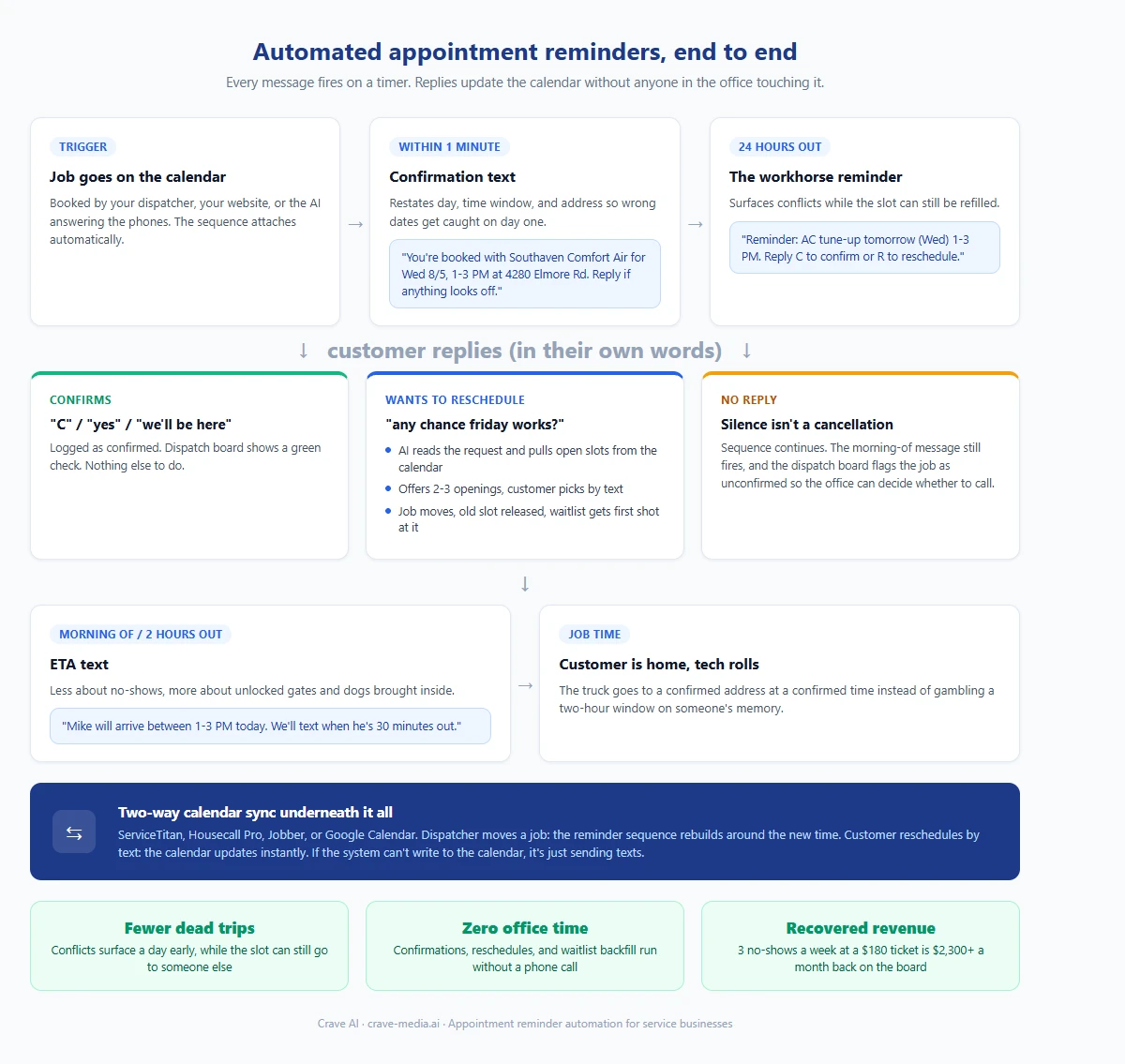
The full appointment reminder sequence, from booking to the tech rolling out: each text fires on a timer, replies update the calendar, and cancelled slots go back on the board. Download as PDF
View interactive version
Why customers no-show in the first place
Almost nobody skips an appointment on purpose. They booked it a week ago, life happened, and the visit fell out of their head. Or they remembered it wrong: Tuesday instead of Thursday, morning instead of afternoon. Or something came up Monday night and they had no easy way to tell you, so they told nobody.
Every one of those failure modes is a communication problem, not a customer problem. The person forgot because nothing reminded them. They couldn't reschedule because your office was closed. A reminder sequence with a reply option closes all three gaps at once, which is why it works so much better than the old "confirmation call the day before" that half your customers never pick up anyway.
The reminder cadence that works
Sending one reminder is better than none. Sending the right three, spaced out, is where no-shows really drop. The cadence we build for a typical service business looks like this.
At booking
A confirmation text goes out within a minute of the job hitting the calendar. It restates the day, the time window, and the address you have on file. This one catches wrong-number and wrong-date mistakes on day one, while the details are still fresh enough for the customer to notice an error.
24 hours out
The workhorse reminder. Day, time window, and a simple reply instruction: reply C to confirm or R to reschedule. This is the message that surfaces the Monday-night conflicts while there's still time to fill the slot with someone else.
The morning of
A short ETA note, two hours out or first thing that morning. "Mike will be there between 10 and 12, we'll text when he's 30 minutes away." By now the appointment has been confirmed twice over, so this message mostly makes sure the gate is unlocked and the dog is inside.
That's it. More messages than that and you start to annoy people; fewer and the forgetful ones slip through. For jobs booked further out, some businesses add a one-week touch, which is worth it for high-ticket work like remodels and worth skipping for a $150 tune-up.
What happens when the customer replies
The replies are where most reminder tools fall down, and where the automation earns its keep. A basic tool can process "C" and "R." Real customers don't text like that. They text "yes but can we do afternoon instead" or "my mother in law is in the hospital, next week?"
An AI layer sitting on the texting number reads those messages the way a person would. A confirmation in any wording gets logged as confirmed. A reschedule request kicks off a short exchange: the system pulls two or three open slots from your calendar and offers them, the customer picks one, and the job moves. A typical exchange runs like this:
Reminder: "Hi Dana, reminder that Southaven Comfort Air is scheduled for your AC tune-up tomorrow (Wed 8/5) between 1-3 PM. Reply C to confirm or R to reschedule."
Dana: "shoot, I have a dentist appt at 2. any chance friday works"
System: "No problem. We have Friday 8/7 openings at 8-10 AM or 3-5 PM. Which works better?"
Dana: "3-5"
System: "Done, you're booked for Friday 8/7, 3-5 PM. We'll send a reminder the day before."
Nobody in your office touched that exchange. The Wednesday 1-3 slot went back on the board Tuesday afternoon instead of turning into a dead trip, and if you keep a waitlist, the system can offer that slot to the next customer on it automatically.
The one reply type that should always route to a human is anything that reads like a complaint or a cancellation of the whole job. The system flags those and hands them to your office staff instead of guessing.
Calendar sync keeps the whole thing honest
Reminders are only as accurate as the calendar behind them, so the sync has to run both directions. When a dispatcher moves a job in ServiceTitan, Housecall Pro, Jobber, or plain Google Calendar, the reminder sequence rebuilds itself around the new time. Nothing is worse than an automated text confidently reminding a customer about a time your own team already changed. It burns trust in every message that follows.
The reverse direction matters just as much. When a customer reschedules by text, the calendar updates instantly, the old slot opens, and the dispatcher sees the change without anyone forwarding screenshots. A system that can't write to your calendar is a texting app with a schedule taped to it.
Setting up appointment reminder automation
The pieces are the same ones behind most of the workflows we recommend automating first: your scheduling system or CRM as the source of truth, a business texting number, and an AI layer that reads replies and talks to the calendar through an API.
Setup for a custom automation like this usually takes a week or two, most of it spent mapping your real-world scheduling quirks: time windows versus exact times, which job types get which cadence, and what counts as "confirmed" for dispatch purposes. Ongoing cost is mostly messaging volume. A company running 300 appointments a month sends roughly a thousand texts, which lands around $30-75 a month with most SMS providers, before the software layer on top.
If you already have missed-call text-back or after-hours follow-up running, reminders plug into the same number and the same AI layer. We covered that setup in our missed call text back walkthrough, and the two systems share almost all of their plumbing.
When this makes sense, and when it doesn't
If your business runs on scheduled appointments with homeowners, this automation pays for itself faster than almost anything else you could build. HVAC tune-ups, carpet cleaning, pest control routes, recurring lawn treatments, in-home estimates: any calendar full of bookings made days in advance is leaking money to forgetfulness right now.
It matters less for pure emergency work. Nobody forgets that their water heater is flooding the garage, so a burst-pipe call doesn't need a 24-hour reminder. Businesses that run mostly on same-day emergency response should put the same money into answering and lead follow-up automation instead.
Off-the-shelf scheduling apps also ship with basic reminder features, and if a canned "your appointment is tomorrow" text with no reply handling is all you need, use the built-in version and save your money. The custom build earns its cost when you want natural-language replies, waitlist backfill, and reminders that can rearrange the calendar on their own.
Start with the math
Count last month's no-shows, multiply by your average ticket, and you have the monthly cost of doing nothing. For most service businesses we talk to, that number is many times what the automation would run them.
If you want a version of this built around your calendar and your customers, tell us about your business and we'll sketch out what the sequence would look like, including what the built-in tools you already pay for can and can't cover.

About the author
Zac Spencer is an online marketing specialist and the owner of Crave Media, based in Salt Lake City, Utah. Since 2013 he has managed hundreds of Google Ads accounts across dozens of industries — with budgets from a few hundred dollars to $250K a month — and founded Crave AI to build custom AI tools and automations for local service businesses.