

Custom AI tools vs. off-the-shelf software for service businesses
You've probably looked at Jobber, ServiceTitan, or Housecall Pro at some point. Maybe you're using one of them right now. And if it's working for you, this article might end with "keep doing what you're doing." That's a real possible outcome here.
But if you've been running into the edges of what those tools can do, if you find yourself building workarounds in spreadsheets or wishing the dashboard showed you different numbers, the question of custom AI tools vs software starts to get interesting. This post breaks down what each option does well, where they fall short, and how to figure out which one makes sense for your business right now.
We build custom AI tools for service companies, so we obviously have a perspective. But we also tell people to stick with off-the-shelf software about half the time, because for a lot of businesses it's the right call. This is that honest version of the comparison.
What off-the-shelf software does well
Generic field service software has gotten pretty good over the last decade. A tool like Jobber or Housecall Pro gives you scheduling, invoicing, basic CRM, and sometimes a customer-facing booking page, all in one package. You pay $50 to $300 a month, you get a login, and you're running within a week.
For a company that's just getting organized, that's worth a lot. Going from paper invoices and a whiteboard schedule to any kind of software is a massive jump. If you're a three-person operation that needs to stop losing track of appointments and start sending professional invoices, Jobber at $69 a month is probably the right answer.
These tools also benefit from scale. Thousands of service companies use them, which means the bugs are mostly worked out, the mobile apps are solid, and there's usually someone on YouTube who made a tutorial for the exact thing you're trying to do.
Where generic tools hit a wall
The problem shows up when your business isn't generic. And most aren't, once you get past the basics.
A plumber and a roofer both schedule jobs and send invoices. But a plumber runs emergency calls at 10 PM that need immediate automated follow-up, while a roofer deals with 80 storm leads in a single morning and needs a pipeline that tracks insurance approvals. A landscaping company runs a six-month sales cycle on $5,000 design projects and needs follow-up sequences that stay warm through the decision window.
ServiceTitan gives all three of them the same dashboard. The same reports. The same workflow. And all three end up with a gap somewhere, usually the exact gap where they're losing money.
The most common complaints we hear from service business owners about their software:
- "I can't see the one number that matters to my business"
- "The reports show me everything except what I need"
- "I'm exporting to Excel every week to get the view I want"
- "The follow-up tools are too generic, so we just do it manually"
That last one is the expensive one. When your team defaults to manual follow-up because the automation doesn't match your workflow, you're paying for software and still doing the work by hand.
What custom AI tools look like
Custom doesn't mean building an entire software platform from scratch. It means building the one or two tools that solve the specific problem your off-the-shelf software can't touch.
Take the HVAC example. We designed a Service Call Revenue Tracker that shows margin per job type, technician performance, and upsell conversion rates on a single screen. ServiceTitan tracks service calls, but it doesn't tell you that your water heater installs carry a 42% margin while your AC tune-ups barely break even. That number changes how you run your business, and no generic dashboard surfaces it.
The roofing version is completely different, because roofing has a completely different bottleneck. A storm damage lead pipeline captures leads during the post-storm surge, auto-qualifies by damage type, tracks insurance review status, and follows up with homeowners who went quiet after filing a claim. No off-the-shelf CRM has an "insurance review" stage because most industries don't need one. Roofers do.
Then there's landscaping, where the problem isn't lead volume but the long quiet gap between proposal and decision. We built a Design Proposal Tracker that tracks close rates by project type and runs follow-up sequences during the decision window. It also handles winter re-engagement campaigns for prospects who went cold. Jobber can't tell the difference between a $800 mulch job and a $6,000 patio redesign. The tracker can, and it treats them differently.
Three industries, three different tools, three different problems. That's what custom means.
The cost question
Off-the-shelf software runs $50 to $300 a month depending on the tier and the number of users. Over a year, that's $600 to $3,600. Over three years, $1,800 to $10,800. You know exactly what you're getting because the feature list is published on the pricing page.
Custom AI tools cost more upfront. A single custom dashboard or automation typically runs in the low thousands, depending on complexity. You're paying for something built specifically for your business, connected to your data, and designed around the problem that's costing you money right now.
The math usually comes down to one question: is the problem you're trying to solve worth more than the tool costs?
If a roofing company loses 60% of storm leads because follow-up can't keep pace, and a custom pipeline recovers even 15% of those, the tool pays for itself in one storm season. If a landscaping company's proposal close rate goes from 30% to 42% because the follow-up automation keeps the conversation alive, that's $39,000 in extra revenue from the same lead volume.
Off-the-shelf is cheaper per month. Custom is cheaper per problem solved, if you have the right problem.
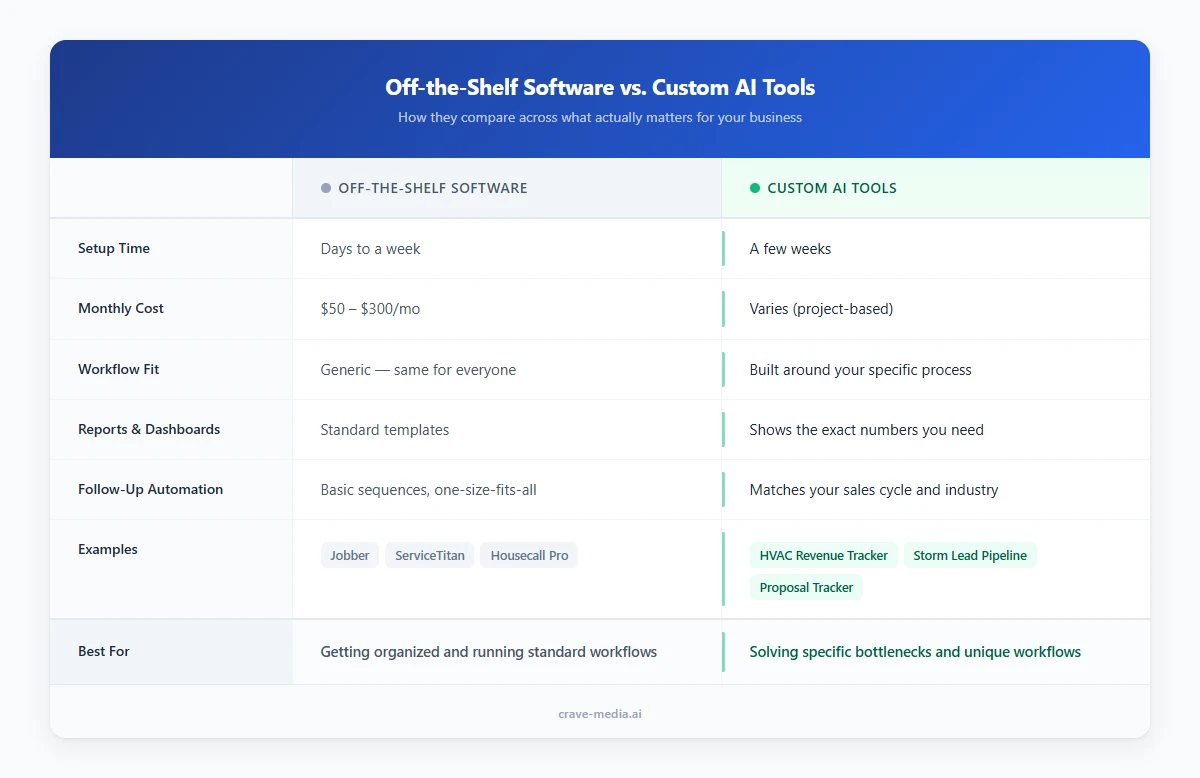
Off-the-shelf software vs. custom AI tools compared across the dimensions that matter most for service businesses, from setup time and monthly cost to workflow fit and follow-up automation. Download as PDF
View interactive version
When off-the-shelf is the right call
Stick with generic software if any of these describe your situation:
- You're a small operation (under 5 people) and your main challenge is getting organized
- Your workflow is standard enough that the software's default process fits
- You're not losing money to a specific bottleneck that the software can't address
- You haven't outgrown the reports and automations that come built in
- Budget is tight and you need to solve five problems at once for $100 a month
There's no shame in this. Jobber exists because most small service companies need exactly what Jobber offers. If the shoe fits, wear it.
When custom AI tools make sense
Custom starts making sense when you've been using off-the-shelf tools for a while and you keep running into the same wall.
The clearest signals:
- You've been exporting data to spreadsheets because the built-in reports don't show what you need
- Your team has built manual workarounds for something the software should handle
- You have a specific workflow that no standard tool accounts for (insurance tracking, seasonal re-engagement, multi-stage proposal management)
- You can point to a dollar amount you're losing because of a gap in your current setup
- You've tried two or three tools and none of them quite fit
If you can describe the problem in one sentence ("we lose storm leads because we can't follow up fast enough" or "we don't know which job types are profitable"), that's the kind of problem a custom tool is built for. If the problem is "we need software," off-the-shelf is where to start.
Questions to ask before you decide
Whether you're evaluating off-the-shelf options or considering custom, a few questions help cut through the noise.
Start with this: what's the one report or view you wish you had? If your current software could show you one thing it doesn't, what would it be? A clear answer usually points toward custom. No answer usually means generic is enough.
Next, watch where your team goes manual. Spreadsheet exports, sticky-note reminders, "I'll follow up tomorrow" promises that don't happen. If it's one or two big gaps, custom can close them. If it's ten small ones, you probably just need better software.
Then put a rough dollar amount on the problem. A landscaping company running 120 consultations a year at a 30% close rate is leaving 84 proposals on the table. At $2,800 average, that's over $235,000 in potential revenue. Even recovering 10% of it is $23,500, which pays for the tool before the year is out.
Last question is the simplest. How weird is your workflow? A cleaning company with a standard book-job-clean-invoice cycle fits what Housecall Pro was built for. A water damage restoration company juggling emergency dispatch, insurance coordination, and equipment tracking across multiple visits doesn't fit anything off the shelf.
The honest answer
Most service businesses should start with off-the-shelf software. It's fast, it's affordable, and it solves 80% of the organizational problems that small companies face.
The other 20% is where custom AI tools earn their keep. That 20% is usually the most expensive 20%, because it's the gap where leads go cold, margins stay invisible, and follow-up doesn't happen. If you know what that gap looks like in your business, that's what we build.
If you're not sure yet, keep using what you have. When the gap gets expensive enough to name, you'll know it's time.

About the author
Zac Spencer is an online marketing specialist and the owner of Crave Media, based in Salt Lake City, Utah. Since 2013 he has managed hundreds of Google Ads accounts across dozens of industries — with budgets from a few hundred dollars to $250K a month — and founded Crave AI to build custom AI tools and automations for local service businesses.