

You've probably never heard of schema markup. That's fine. Most plumbers, roofers, and cleaning company owners haven't. But there's a good chance it's the reason your competitor shows up in AI search results and you don't.
Schema markup is a small block of code that sits on your website and tells search engines exactly what your business does, where you operate, and what services you offer. Think of it as a name tag for your website, except instead of just your name, it includes your phone number, service area, hours, reviews, and every service you provide, all in a format that Google, ChatGPT, and other AI tools can read instantly.
This post breaks down what schema markup is, why it matters now more than ever for local service businesses, and what you can do about it this week.
How search engines read your site
When Google or an AI model visits your website, it doesn't see what you see. It sees code. And most of that code is designed to make things look nice for humans, not to organize information for machines.
Your website might say "We're Nashville's top-rated plumbing company with 15 years of experience serving Davidson and Williamson counties." A human reads that and understands it. A search engine reads it and has to guess. Is "Nashville" your location or just a word on the page? Is "plumbing" your main service or just something you mentioned? Are those counties your service area or places you're talking about?
Schema markup removes the guessing.
What schema markup looks like
Schema markup is a block of structured data, usually in a format called JSON-LD, that you add to your website's code. You don't see it on the page. Your customers don't see it either. Only search engines and AI models read it.
Here's a simplified example for a plumbing company:
{
  "@type": "Plumber",
  "name": "Nashville Pro Plumbing",
  "telephone": "(615) 555-0142",
  "areaServed": ["Nashville", "Franklin", "Brentwood"],
  "serviceType": ["Water Heater Repair", "Drain Cleaning", "Emergency Plumbing"],
  "aggregateRating": {
    "ratingValue": "4.8",
    "reviewCount": "247"
  }
}
That's it. No magic. It's a structured list of facts about the business, written in a way machines can parse without ambiguity.
The schema vocabulary comes from Schema.org, a project that Google, Microsoft, and Yahoo built together starting in 2011. It defines hundreds of business types and properties. There's a type for plumbers, HVAC contractors, electricians, house cleaners, roofers, landscapers, and just about every other local service you can think of.
Why this matters now, not just later
For years, schema markup was a "nice to have." It helped you get those fancy rich results in Google, the ones with star ratings and business hours right in the search listing. Helpful, but not a dealbreaker.
That changed when AI search became real.
Tools like Google's AI Overviews, ChatGPT with browsing, and Perplexity don't show you ten blue links. They read the web and give you a direct answer. When someone asks "who's the best plumber in Nashville for water heater repair," these tools pull from structured data to build their response.
If your website has schema markup that says you're a plumber in Nashville who does water heater repair with a 4.8-star rating from 247 reviews, you've handed the AI exactly what it needs to recommend you.
If your website doesn't have schema, the AI has to scrape your homepage, guess at your services, and hope it gets it right. Often, it just picks someone else.
We wrote about this shift in our earlier post on AI search visibility for local businesses. The short version: AI search is pulling answers from structured data, and schema markup is the most direct way to provide it.
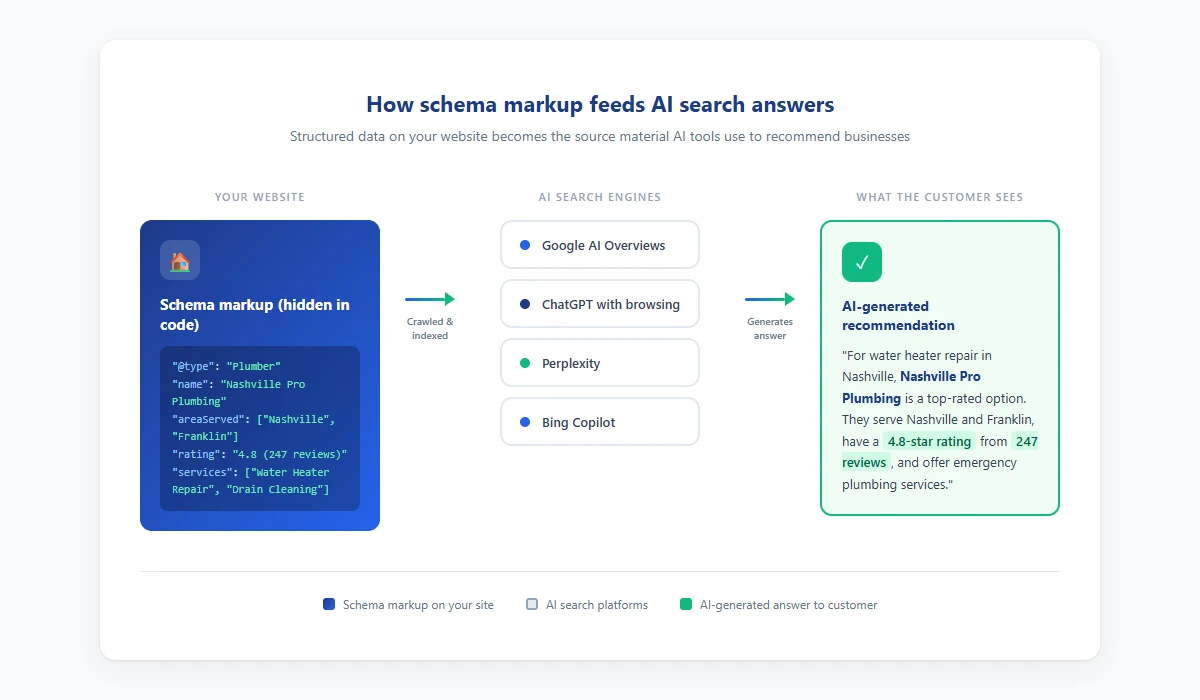
This diagram shows how structured data on your website gets crawled by AI search platforms and turned into the recommendations customers see. Download as PDF
View interactive version
The specific schema types that matter
Not all schema is equally useful. For a local service business, there are four types that do the most work.
LocalBusiness and its subtypes
This is your foundation. It tells search engines your business name, address, phone number, hours, and what category you fall into. Schema.org has specific subtypes like Plumber, Electrician, RoofingContractor, HVACBusiness, and LockSmith. Use the most specific one that fits.
Service
This describes each individual service you offer. You can list the service name, a description, the area where you offer it, and even a price range. A cleaning company might have separate Service entries for "deep cleaning," "move-out cleaning," and "recurring weekly cleaning."
Review and AggregateRating
These attach your review data directly to your schema. When an AI sees that you have 247 reviews with a 4.8 average, that's a strong signal. Without schema, your reviews exist on Google Maps or Yelp, but they're not connected to your website in a way AI models can easily parse.
ServiceArea
This tells AI exactly where you work. Not just your office address, but every city, zip code, or county you serve. For service-area businesses that go to the customer's location, this is the difference between showing up for "plumber near me" in three towns versus one.
What good schema coverage looks like
Let's say you run a tree service company in the Atlanta metro area. Complete schema coverage on your site would include:
LocalBusiness schema on your homepage with your company name, phone, address, hours, service area (15 cities you cover), aggregate rating, and a list of your core services.
Service schema on each service page for that specific offering (tree removal, tree trimming, stump grinding, emergency storm cleanup), including the areas where you offer it and a price range if you're comfortable sharing one.
LocalBusiness schema tuned to each specific area on your location pages, with the local phone number and the services available there.
Individual Review schema entries on your review page with the reviewer's name, rating, and date.
That level of coverage means that when someone in Marietta asks an AI "who does emergency tree removal near me," your business has structured data matching every part of that query: the service type, the location, and the credibility signal from your reviews.
How to check what you have now
Before you do anything else, check your current schema. It takes about two minutes.
Go to Google's Rich Results Test at search.google.com/test/rich-results. Paste in your homepage URL. Hit "Test URL."
Look at the results. If you see "No rich results detected," you have no schema. If you see some results, click into each one and check whether it's complete. A LocalBusiness entry with just your name and no services, reviews, or service area isn't doing much for you.
Check your service pages too, not just your homepage. Each page that targets a specific service or location should have its own schema.
Most local service business websites have either no schema at all or a bare-minimum block that their website builder added automatically. Those auto-generated blocks usually include your business name and address but skip services, service areas, and reviews.
Common problems we see
Missing service types are the most frequent issue. Your schema says "Home Improvement" when it should say "Plumber" or "RoofingContractor." The more specific your business type, the better AI can match you to relevant queries.
No service area data is another big one. Your schema lists your office address but doesn't mention the 20 other cities you serve. AI search treats you as a single-location business.
Outdated information hurts more than you'd expect. Your schema shows old hours, a disconnected phone number, or services you no longer offer. Bad data is worse than no data because AI will confidently serve wrong answers.
Having schema only on the homepage is a missed opportunity. Your homepage has schema but your 12 service pages and 8 location pages have nothing. That's like putting a sign on your front door but leaving every other window blank.
And missing review data in your schema means your Google Business Profile's 300 reviews aren't connected to your website in a way AI models can easily use.
Adding schema without touching code
You don't need to know how to code to add schema markup. There are a few paths depending on your setup.
If you're on WordPress, plugins like Rank Math, Yoast SEO, or Schema Pro let you fill in forms and the plugin generates the code. Rank Math's free version handles LocalBusiness schema. The paid version ($59/year) adds more schema types.
Wix and Squarespace both have built-in structured data for basic business info, but it's limited. You'll probably need to add custom code blocks for complete coverage, which means either learning a little JSON-LD or hiring someone.
For custom or agency-built sites, talk to whoever built your site. Ask them specifically about JSON-LD structured data for LocalBusiness, Service, and AggregateRating types. If they don't know what you're talking about, that's a red flag.
For any path, run the Rich Results Test again after you've made changes. If Google can read it, AI models can too.
Where Crave AI comes in
We build AI visibility into our client sites from the start, and schema markup is one of the first things we set up. It's not glamorous work. Nobody's going to high-five you for having clean JSON-LD on your service pages. But it's the kind of foundational work that determines whether AI search tools can find and recommend your business.
Our approach is to build comprehensive schema that covers your full service catalog and every area you serve, then keep it updated as your business changes. We also monitor how AI models reference your business and adjust when something's off.
Schema by itself won't make you the top result for every query. But without it, you're asking AI to guess about your business while your competitors are handing it answers.
What to do this week
Pick one thing from this list:
- Run the Rich Results Test on your homepage. Just see what's there.
- Check whether your website lists every service you offer and every city you serve, not just on the page, but in structured data.
- If you're on WordPress, install Rank Math and fill in the LocalBusiness schema fields. It takes about 20 minutes.
- If you want it done right and don't want to think about it again, talk to us about AI visibility. We'll audit your current schema and tell you exactly what's missing.
Schema markup isn't new technology. It's been around since 2011. But the way search works has changed, and structured data went from a minor SEO bonus to the primary way AI tools decide which businesses to recommend. The businesses that get this right now will have a real edge over the next two years.
Don't wait until every competitor in your market figures this out too.

About the author
Zac Spencer is an online marketing specialist and the owner of Crave Media, based in Salt Lake City, Utah. Since 2013 he has managed hundreds of Google Ads accounts across dozens of industries — with budgets from a few hundred dollars to $250K a month — and founded Crave AI to build custom AI tools and automations for local service businesses.