

What a custom reporting dashboard could do for a general contractor
You're running a $95,000 kitchen remodel and a $40,000 bathroom addition at the same time. The kitchen homeowner called twice yesterday asking if the cabinet order came in. The bathroom homeowner wants to know why the plumber didn't show up Tuesday. Your project manager is on the phone with the framing sub trying to schedule next week, and you're driving between both sites trying to keep everything moving.
None of these conversations are about the work itself. They're about updates. Where things stand. What's happening next. And they eat hours every single day.
This is the communication problem that kills general contracting profitability. The work goes fine. The updates drain everyone. A homeowner spending $95,000 on a kitchen doesn't want to wonder what happened today. They want to know, and if you don't tell them, they'll call. Repeatedly.
We'd build an AI reporting dashboard for general contractors that handles the daily communication load, tracks budgets across multiple projects, manages change orders with real cost impact, and gives each client their own view into what's happening with their project. Your PM stops being a full-time communicator and goes back to running the job.
The communication tax on every project
A home renovation is the second-biggest purchase most homeowners will ever make. They're spending $40,000 to $150,000 on something they can't fully evaluate while it's happening. They see drywall dust, loose wires, and strangers walking through their house for months. The anxiety is constant, and the only thing that relieves it is information.
Most GCs handle this with phone calls and text messages. Your PM texts a photo when something looks good. The homeowner texts when they're worried. Back and forth, all day, across however many active projects you're running. Multiply that by five or eight concurrent jobs and your PM spends more time answering questions than managing subcontractors.
The bigger problem is what doesn't get communicated. Budget adjustments that should have been discussed earlier. Delays that build up over a week before anyone mentions them. Change orders that get verbal approval but no documentation until the final invoice, when the homeowner is surprised by the total.
None of this is malicious. It's what happens when your communication system is a group text and your project manager has too many things competing for their attention.
What the dashboard would do
The system we'd build gives every active project its own reporting portal. The homeowner gets a login. Your PM gets a dashboard that shows all projects at once. Subcontractors update their status from the field.
The project timeline is the spine of it. Every major phase (demo, framing, rough-in, inspections, finishes) has a start date, projected end date, and current status. When a sub marks framing as complete, the timeline updates and the homeowner sees it. No phone call required.
Budget tracking runs alongside the timeline. The homeowner sees the original contract amount and any approved change orders, with a running total. They don't see your internal costs or margins. They see what they agreed to pay and what has changed. When the total goes from $95,000 to $98,400 because they added under-cabinet lighting, the dashboard shows that change with the date it was approved and the exact dollar impact.
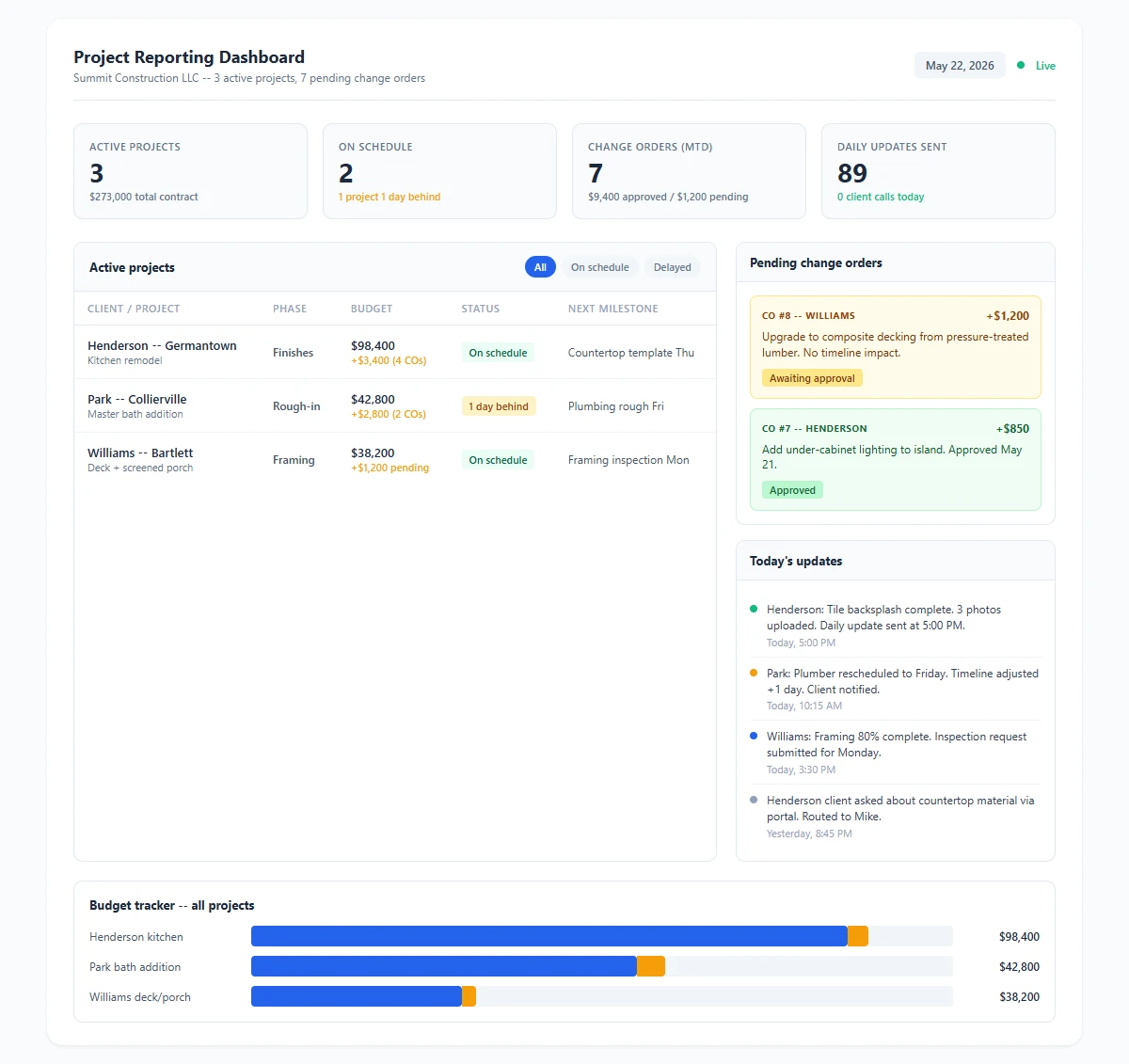
Project reporting dashboard for a general contractor showing active projects, budget vs. approved changes, inspection schedule, and daily progress updates across multiple residential jobs. Download as PDF
View interactive version
Daily progress updates go out automatically. Your PM takes a few photos at each site, uploads them to the app, and adds a one-line note if anything is worth mentioning. The system generates a daily summary and sends it to the homeowner by text or email: "Framing complete on south wall. Electrician on site tomorrow for rough-in. Project is on schedule." If the PM doesn't add a note, the system still sends an update based on sub status changes and schedule data.
The homeowner reads that at 7 PM while eating dinner and doesn't call you at 7:30 asking what happened today.
Change orders without the arguments
Change orders are where most client relationships go sideways. The homeowner asks for something mid-project ("Can we move that outlet?" "What about a bigger window here?"). The PM says "sure, we can do that." Work proceeds. Nobody documents the cost impact until later, and when the final invoice is $8,000 over the original contract, the homeowner feels blindsided even though every change was their idea.
The dashboard handles change orders as a formal workflow. When the homeowner requests a change (or when your PM identifies one), it gets entered into the system with the cost impact and any timeline adjustment. The homeowner sees a notification: "Change order #4: relocate kitchen island electrical to accommodate larger island. Cost: +$1,200. Timeline: no impact. Approve or discuss?"
The homeowner approves it in the app. The budget updates. The change is logged with a timestamp and their approval. When the project wraps up and the final invoice is $6,800 above the original contract, every dollar of that overage has a documented approval attached to it. There's nothing to argue about because the homeowner agreed to each change in real time.
This sounds like common sense, and it is. But most GCs skip the formal documentation because it takes too long when you're doing it manually. A system that makes change order documentation a two-minute task instead of a 20-minute conversation fixes the problem without adding work.
A Wednesday morning across three active projects
You've got three jobs running: a kitchen remodel in Germantown, a master bath addition in Collierville, and a deck-and-screened-porch build in Bartlett. Your PM, Mike, starts his day at the office before heading to the Germantown site.
He opens the dashboard and sees all three projects on one screen. Germantown is in the finish phase, on schedule, with the tile sub finishing today and the countertop template happening Thursday. Collierville is in rough-in, one day behind because the plumber rescheduled. Bartlett is in framing, on schedule.
The Collierville delay needs attention. Mike taps into that project and sees the plumber's update: "Rescheduled to Friday, needed parts for the custom shower valve." The system already adjusted the timeline by one day and flagged the inspection date for review. Mike confirms the updated inspection request and moves on.
At the Germantown site, the homeowner had sent a message through the portal last night asking about the countertop material. The tile sub is there when Mike arrives. He snaps three photos of the finished backsplash, uploads them, and replies to the homeowner's question in the portal. The system sends the daily update to all three homeowners at 5 PM with the photos and status changes.
Mike's phone didn't ring once from a homeowner that morning. It rang twice from subs, which is what his phone should be used for.
Connecting to your existing setup
This doesn't replace Buildertrend or CoConstruct or whatever project management software you're already using. If you have a system that handles scheduling and budgeting, the dashboard sits on top of it and handles the client-facing communication layer. It's a custom tool built around your workflow, not another generic SaaS product you have to reshape your process around.
If you're using spreadsheets and a whiteboard (and plenty of GCs running 3 to 8 projects at a time still do), the dashboard becomes your project management system, at least for tracking and communication.
The AI automation layer handles the daily update generation. Your PM uploads photos and status changes. The system writes the update, sends it to the client, and logs everything. If a homeowner replies with a question, the AI can answer routine ones (schedule questions, inspection dates, what phase is next) and route anything that needs judgment to your PM.
This is similar to how after-hours lead response works for other service businesses. The AI handles the routine communication so your people can focus on the work that requires experience and decision-making.
Setup takes about a week. We'd need your project templates (phases, typical timelines), your current budgeting structure, and access to any existing software you use for scheduling. From there, we build the portal, set up the automation rules, and train your PM on the two-minute daily workflow.
What changes for your business
The communication improvement is obvious, but the downstream effects matter more.
Your close rate on new projects goes up. When a homeowner is choosing between three contractors for a $120,000 addition, and you can show them the portal during the sales meeting ("this is what you'll see every day during your project"), that differentiates you from every GC who says "we'll keep you updated" and means "we'll call you when we remember." Homeowners spending six figures on their home want to feel informed. A portal that shows them exactly how you communicate is worth more than a flashier truck or a nicer website.
Your change order disputes drop to near zero. When every change is documented with timestamps and approvals, there's no room for "I didn't agree to that" at the final invoice. This alone pays for the system on a single project if you've ever eaten a $3,000 change order because you couldn't prove the homeowner approved it.
Your PM handles more projects. The phone calls and update texts that eat two to three hours a day get replaced by a 30-minute daily workflow across all active projects. A PM who was maxed out at five concurrent jobs can handle seven or eight because the communication overhead dropped by more than half.
And your reviews get better. The number one complaint in contractor reviews isn't bad work. It's poor communication. "They did good work but we never knew what was going on." A project portal that keeps homeowners informed every day eliminates that complaint from your review profile.
Where we'd start
If you're a GC running three or more projects at a time and your PM is spending hours on update calls, this is one of the more straightforward AI tools to build. The scope is defined: project timelines, budget tracking, change order management, and daily updates.
We'd start with your most common project type. If you do mostly kitchen and bath remodels, we'd build the template around that workflow. Once it's running, adding templates for additions, whole-house renovations, or commercial buildouts is a matter of adapting the phases and timeline structure.
The ROI shows up fast. One fewer hour of phone calls per day across your PM team, one change order dispute avoided per quarter, and a measurable bump in close rate from showing the portal during sales. That math works on the first project.
If you want to see what this would look like for your company specifically, get in touch and we'll walk through it with your actual project data.

About the author
Zac Spencer is an online marketing specialist and the owner of Crave Media, based in Salt Lake City, Utah. Since 2013 he has managed hundreds of Google Ads accounts across dozens of industries — with budgets from a few hundred dollars to $250K a month — and founded Crave AI to build custom AI tools and automations for local service businesses.