

What an AI technician dashboard looks like for a cleaning company
You have six cleaners on the schedule today across three teams. By the time you finish your coffee, two clients have texted. One says her cleaner did an incredible job and asks if she can request the same person every week. The other says her kitchen floor wasn't touched and she's not sure she wants to keep the service.
Both texts are about the same thing: which cleaner went to which house, and how good the work was. And right now, the only way you can answer either question is from memory, a paper schedule, and whatever you can piece together by calling the cleaner.
That gap is the problem. You're running a business where the product is the work your cleaners do in someone's home, and you have almost no visibility into how the work is going until a client is either delighted or done. By the time you find out a cleaner is slipping, you've usually already lost the account.
We'd build an AI technician dashboard for a cleaning company that tracks every cleaner's job times, customer ratings, redo rate, and revenue in one place. You stop guessing who your best people are and start knowing, which changes how you schedule, coach, and pay them.
Why cleaning companies fly blind on their own crew
House cleaning is a recurring revenue business. One deep clean covers a slow week, but a weekly client who stays two years is worth around $6,000. The whole model depends on keeping those clients happy, and your cleaners are the only ones in the room when the work happens.
The trouble is that most owners can't see the work. You're not in the houses. You find out how a cleaner is doing through complaints, which means you find out late. A client doesn't usually call after the first disappointing clean. She quietly decides she's done, skips a week, then cancels. The cleaner who caused it never knew there was a problem, and neither did you.
Most cleaning companies run all of this from a notebook or a basic scheduling app. The schedule tells you who's supposed to be where. It tells you nothing about whether the Tuesday team is consistently running 40 minutes long, whether one cleaner's clients rate her a full point higher than everyone else, or whether your newest hire has had three redo requests in two weeks.
So you make decisions blind. You assign clients based on geography and availability instead of fit. You hand out raises based on who's been there longest instead of who does the best work. And you lose good clients to problems you could have caught a month earlier.
What the dashboard would track
The system we'd build gives you one screen for your whole crew. Every cleaner has a profile, and every completed job feeds data into it. No one fills out forms. The information comes from the schedule, the booking system, and a quick post-job rating the client gets by text.
Job time is the first thing it tracks. The system knows each cleaner clocked in and out of each job, and it compares that against the time the job was quoted for. A two-hour standard clean that consistently takes one cleaner 90 minutes and another two and a half hours tells you something real. Maybe the fast one is cutting corners. Maybe the slow one is thorough and should be on your detail-oriented clients. The dashboard doesn't decide that for you, but it shows you the pattern so you can ask the right question.
Customer ratings come next. After each visit, the client gets a short text: "How did today's cleaning go?" with a one-to-five scale and an optional comment. Those ratings attach to the specific cleaner who did the work, not just the company. Over a month, you can see that one cleaner averages 4.9 with comments like "spotless every time," while another sits at 4.1 with a few "fine but missed the baseboards" notes. That's the difference between a client who refers her neighbor and one who's drifting toward cancellation.
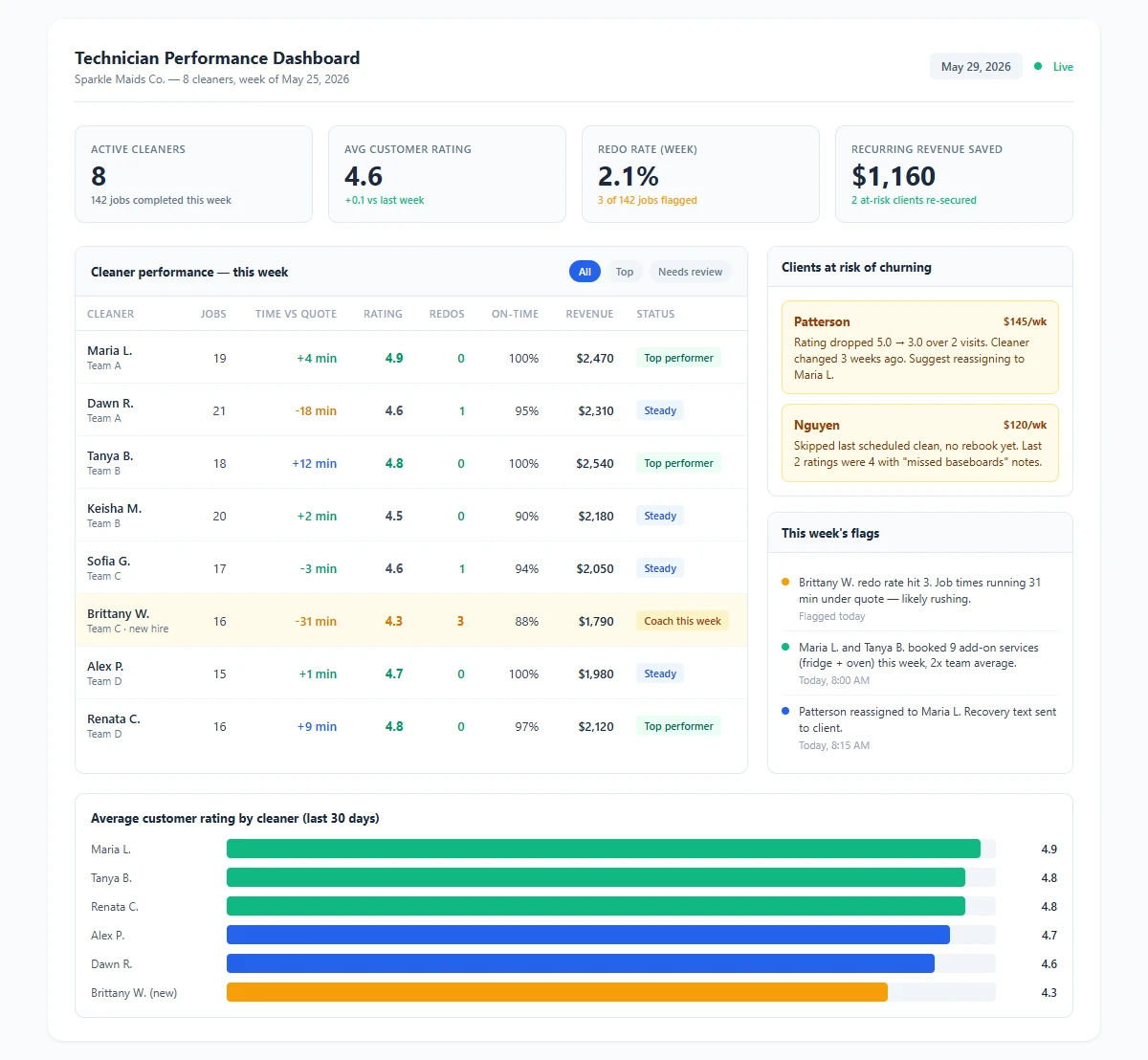
Technician performance dashboard for a house cleaning company showing each cleaner's customer rating, job time versus quote, redo rate, on-time arrival, and revenue generated, with the clients most at risk of churning flagged at the bottom. Download as PDF
View interactive version
The redo rate is the metric most owners wish they had. Every time a client asks for something to be re-cleaned or reports a missed area, the system logs it against that cleaner. One redo is noise. A redo rate that climbs over a few weeks is an early warning that something changed, maybe the cleaner is rushing because she picked up too many jobs, maybe she's burned out. You see it while you can still fix it.
On-time arrival rounds out the basics. Cleaning clients care about their schedule. A cleaner who's reliably 20 minutes late, even if the work is great, generates complaints that look like quality problems but aren't. Separating "late" from "bad work" in the data lets you coach the right issue.
Turning data into a better schedule
The point of all this isn't to build a surveillance tool for your cleaners. It's to make better calls with information you don't currently have.
Take scheduling. Once you can see that one cleaner consistently earns 4.9 ratings on detailed homes and another is faster and great with standard recurring jobs, you stop assigning by zip code alone. You put your most thorough cleaner on the high-value clients who notice everything, and your efficient one on the volume routes where speed matters more. Your best clients get matched with the people most likely to keep them, which is the entire game in recurring revenue.
The same data flags clients before they leave. When a client's ratings start dropping or a redo request comes in on an account that used to be smooth, the dashboard surfaces it. That's the moment to call the client and the cleaner before the account goes quiet. Catching one churning client a month who pays $150 a week saves you more than the system costs. This is the same early-warning logic behind the customer retention dashboard we'd build for a pest control company, applied to the cleaner level instead of the plan level.
A Monday morning with the dashboard open
You've got eight cleaners working today. Instead of calling around, you open the dashboard with your coffee.
The top of the screen shows the team at a glance. Seven cleaners are green. One, your newest hire, has a yellow flag: her redo rate hit 3 this week and her average rating dropped from 4.7 to 4.3. You tap into her profile and see the pattern. Her job times have been running short, around 30 minutes under quote on her last five cleans. She's rushing. You make a note to ride along with her Thursday and slow her down before a client complains.
Down in the at-risk section, the system flagged the Patterson account. They've been weekly clients for 14 months at $145 a visit, and their last two ratings were 3s after a long run of 5s. The cleaner assigned changed three weeks ago when you reshuffled routes. You move them back to their original cleaner and send a quick "we want to make sure everything's perfect, anything we should know?" text. The account stabilizes instead of canceling.
On the revenue side, you can see that two of your cleaners have been quietly booking add-on services, inside-fridge and oven cleans, at twice the rate of everyone else. They're not just cleaning, they're selling. That's worth a bonus, and now you can prove who earned it instead of guessing.
None of that required you to be in a single house. It took ten minutes and a dashboard that already had the answers.
How it fits your existing setup
If you're running a booking system like Launch27, Jobber, or BookingKoala, this dashboard sits on top of it. Those tools handle scheduling and payments well, but they don't give you a real per-cleaner performance view that combines time, ratings, redos, and revenue in one place. The dashboard pulls from your existing schedule and booking data, adds the post-job rating texts, and assembles the cleaner profiles. It's a custom tool built around how you already work, not another platform you have to migrate everything into.
If you're still on a spreadsheet and a notebook, the dashboard becomes your tracking system, and we'd build the booking-to-dashboard flow from whatever you use to schedule jobs now.
The automation layer handles the parts that would otherwise be your job. It sends the rating request after each clean, logs the responses against the right cleaner, watches for redo requests and rating drops, and flags at-risk clients without anyone checking manually. The same kind of post-job follow-up runs behind the automated review requests we'd set up for a carpet cleaning company, where the rating text doubles as the prompt that turns a happy client into a public review.
Setup runs about a week. We'd need your list of cleaners, your typical job types and quoted times, and access to whatever you schedule with now. From there we build the profiles, wire up the rating texts, and set the thresholds that decide when a cleaner or a client gets flagged.
What changes once you can see your crew
The first thing that changes is how you coach. Instead of a vague "try to be more thorough" conversation, you sit down with a cleaner and a screen that shows her job times, her ratings, and the two redos from last week. The conversation gets specific and a lot less personal, because you're both looking at the same numbers.
Pay gets fairer, which keeps your good people. When you can see that one cleaner carries a 4.9 rating, almost no redos, and steady add-on sales, a raise or a bonus is an easy call you can defend. Your best cleaners are the ones competitors try to poach. A company that recognizes and rewards them on real performance keeps them longer.
Client retention improves because you stop losing accounts to problems you couldn't see. The churn that used to show up as a revenue dip three weeks later now shows up as a yellow flag you act on the same day. In a business where a retained weekly client is worth thousands a year, catching even a few saves real money.
And you get your time back. The mental load of trying to track six or eight cleaners in your head, who's good with which clients, who's been slipping, who deserves the better routes, moves to a screen that remembers everything. You make the decisions. The dashboard just makes sure you're making them with the facts.
Where we'd start
If you're running four or more cleaners and you can't quickly answer "who are my two best people and why," this is one of the more direct AI tools to build. The data already exists in your schedule and your clients' heads. The dashboard just collects it and puts it where you can use it.
We'd start with the metrics that matter most for your business, usually customer rating and redo rate, since those predict churn fastest. Once that's running and you trust the numbers, adding job-time tracking, revenue per cleaner, and add-on attribution takes little extra work.
If you want to see what this would look like for your crew specifically, get in touch and we'll walk through it with your actual cleaner roster and job data.

About the author
Zac Spencer is an online marketing specialist and the owner of Crave Media, based in Salt Lake City, Utah. Since 2013 he has managed hundreds of Google Ads accounts across dozens of industries — with budgets from a few hundred dollars to $250K a month — and founded Crave AI to build custom AI tools and automations for local service businesses.