

You've gotten those texts before. The ones that feel like a vending machine wrote them. "Thank you for your inquiry! A representative will be in touch shortly. Reply STOP to unsubscribe."
Nobody reads that and thinks "wow, they really care about my leaking faucet."
The whole promise of AI SMS follow-up is that it doesn't have to work that way. A system can read what someone actually wrote, respond to their specific problem, carry a short conversation, and hand things off to a real person when it's time. The customer gets a fast, useful reply. You get a qualified lead instead of a voicemail you'll find in the morning.
But there's a gap between that promise and how most businesses imagine it working. People picture a chatbot firing off canned responses. The reality, when it's built right, is closer to a really sharp front desk person who happens to work at 2 AM.
So let's talk about how the tech works, what the messages look like in practice, and what separates a good AI SMS system from one that makes your company look worse than silence would.
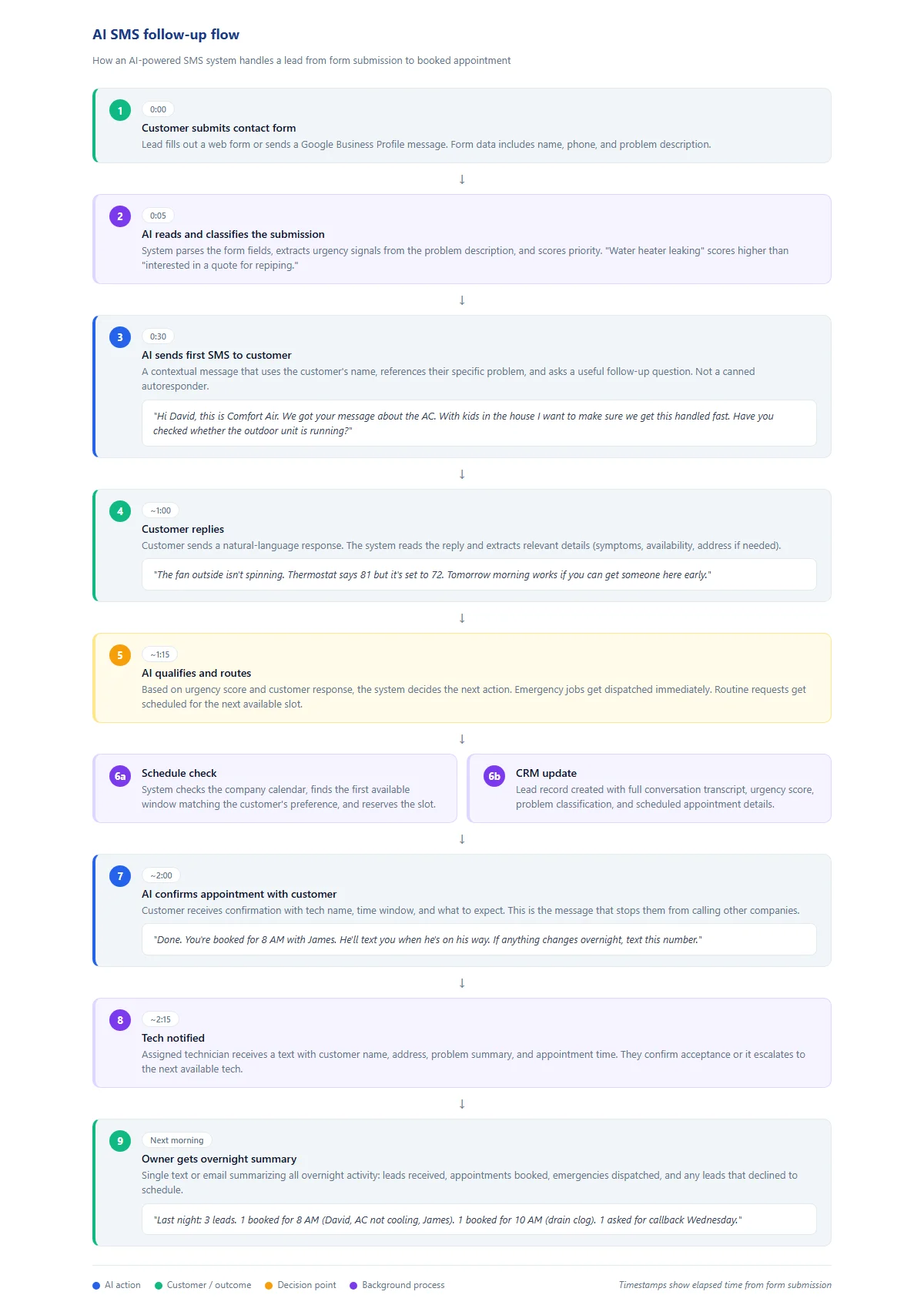
The AI SMS follow-up flow: a lead submits a form, the AI reads the problem and sends a contextual text, carries a short conversation to qualify and schedule, then confirms the appointment and logs everything to the CRM. Download as PDF
View interactive version
Speed is the whole game
The reason SMS follow-up matters at all comes down to one thing: response time.
The data on this is consistent across every study that's looked at it. If you respond to a web lead within five minutes, you are significantly more likely to convert that lead than if you respond in 30 minutes. After an hour, your odds crater. After overnight, you're competing with whoever the customer found at 8 AM.
For service businesses, this problem is worse than average. A homeowner with a clogged drain or a broken AC isn't browsing. They're filling out three contact forms in a row and going with whoever answers first. Your form could be the one they fill out, but if your reply shows up six hours later, you already lost.
AI SMS follow-up solves this by collapsing that response gap to under a minute. Not with a "thanks for reaching out" autoresponder, but with a message that references the person's actual problem. That distinction is what makes it work.
We covered this in detail in the after-hours lead follow-up post, walking through an end-to-end scenario of a 10 PM plumbing emergency. The speed piece is the foundation. Everything else builds on top of it.
What a real AI SMS conversation looks like
The easiest way to understand how this works is to watch a conversation play out. Here's a realistic example for an HVAC company.
A homeowner named David fills out a contact form at 8:47 PM on a Thursday. The form says: "AC stopped blowing cold air this afternoon. House is getting hot. Two kids under 5."
Within 30 seconds, David gets a text:
Hi David, this is Comfort Air. We got your message about the AC. With kids in the house I want to make sure we get this handled fast. Have you checked whether the outdoor unit is running, or is it completely dead?
David replies: "I looked outside and the fan isn't spinning. The thermostat is set to 72 but it's reading 81 in here."
The system responds:
Sounds like it could be a compressor or capacitor issue. We can get a tech out first thing tomorrow morning. Would an 8-9 AM window work, or do you need someone tonight? We do have emergency service available.
David: "Tomorrow morning is fine if you can guarantee the 8 AM slot. It's supposed to cool down overnight."
Done. You're booked for 8 AM with James. He'll text you when he's on his way. If anything changes overnight or it gets worse, text this number and we'll get someone out sooner.
Four messages. Under three minutes total. David stops Googling other HVAC companies. He has a name, a time, and a backup plan.
Now compare that to what most HVAC companies send at 8:47 PM on a Thursday: nothing. Maybe an email confirmation that says "We received your request and will respond within 24 hours." David has already moved on.
How the system reads and responds
The conversation above looks simple, and that's the point. But the system is doing several things at once to make it feel that way.
When David's form comes in, the first thing that happens is the AI reads the submission and pulls out what matters. His name. His phone number. The problem description. And any words that signal urgency. "Kids under 5" and "getting hot" both flag this as higher priority than a routine maintenance request.
The first message has to do a lot at once. It needs to acknowledge the specific problem, not fire off a generic "thanks for reaching out." It should ask a diagnostic question that makes sense for the situation. And it buys the system time while the customer types a reply and the backend prepares next steps.
When David replies, the AI reads his response and matches it against what it knows about common HVAC issues. Fan not spinning plus no cold air is a familiar pattern. It doesn't diagnose the problem (that's the tech's job), but it can say something informed enough that David feels like he's talking to someone who knows what they're doing.
Then the scheduling. The system checks the company's calendar, finds the first available slot, and offers it. If the company has emergency dispatch rules set up, the system knows whether to offer same-night service based on the urgency score it already calculated.
All of this happens without a human touching anything. The tech gets a notification about his 8 AM booking. The office sees a new job in the CRM when they open up in the morning. The owner gets a summary of last night's leads.
What makes it sound human instead of robotic
This is where most automated systems fall apart. The technology to send a text message is easy. The technology to send a text message that doesn't make people cringe is harder.
A few things separate good AI SMS from bad.
First, the messages reference the customer's actual words. If someone writes "my basement is flooding," the reply mentions their basement flooding. Not "your service request." Not "your recent inquiry." The specific thing they said, reflected back to them.
Message length matters too. Real people don't send perfectly formatted 50-word paragraphs every time. Sometimes the right response is one sentence. Sometimes it's three. The system should match the rhythm of the conversation instead of dumping a wall of text regardless of context.
Then there's the questions. "What's your address?" is fine when you need to dispatch someone. "On a scale of 1-10, how urgent is your request?" is a form field pretending to be a conversation. Good systems ask questions that a competent person would ask in the same situation.
And it has to know when to stop. The conversation runs until there's a clear outcome: appointment booked, emergency dispatched, or customer declines service. No follow-up survey 10 minutes later. No drip campaign enrollment without being asked. When the job is done, the texting stops.
And it identifies itself honestly. The system sends messages using the company name and a real employee name when possible. It isn't pretending to be a human. Customers generally don't care whether the first response was written by a person or a machine, as long as it was fast, relevant, and got them what they needed.
The difference between autoresponders and AI follow-up
Most "automated SMS" systems on the market aren't doing what we're describing here, and the distinction matters.
A standard autoresponder fires the same canned message to everyone. "Thanks for contacting us! We'll be in touch within 24 hours." It doesn't read the form. It doesn't know if you have a flooded basement or a question about annual maintenance pricing. It's a receipt, not a conversation.
A template-based system is slightly better. It might pull the customer's name and plug it into a pre-written message. "Hi David, thanks for reaching out to Comfort Air!" But it still can't respond to what David actually said or carry a back-and-forth.
What we're talking about is a system that reads natural language, generates contextual replies, handles multi-turn conversations, and makes routing decisions based on what it learns from the exchange. That's a different category of tool. It's closer to what the 5 workflows post describes as intelligent automation versus simple automation.
The gap matters because customers can feel the difference instantly. A canned autoresponder tells them they're talking to a machine. A contextual AI response tells them someone is paying attention, even at 10 PM.
Where this fits in your business
AI SMS follow-up works best for businesses where leads come in through web forms, Google Business Profile messages, or similar text-based channels, and where response speed directly affects whether you win the job.
That covers most service businesses. HVAC, plumbing, electrical, roofing, pest control, cleaning, tree service, garage door. If your customers have a problem and they're looking for someone to fix it now, fast response wins.
It's less useful for businesses where the sales cycle is long and leads expect to wait. Custom home builders, architects, interior designers. If your typical customer fills out a form and then waits two weeks for a consultation, instant SMS response doesn't move the needle the same way.
The sweet spot is businesses that get 5-30 leads per day, have some portion arriving outside business hours, and compete locally against other companies offering similar services. That's where the math works cleanly: faster response means more booked jobs, and the system pays for itself within the first few weeks.
If you're not sure whether your lead flow fits this model, the simplest test is to track your after-hours leads for two weeks. Write down when they came in, how fast you responded, and how many booked. If you see money sitting on the table, you probably already know.
What it takes to get this running
The setup isn't as complicated as it sounds when you read about AI and SMS in the same sentence.
Start with a CRM or lead capture system that can trigger an action when a new lead arrives. Most modern systems do this through webhooks or native integrations. If yours can't, that's the first thing to fix.
From there, an SMS provider. Twilio handles this for most businesses. Costs at typical lead volumes are a few cents per message.
The AI layer is the part that's custom to your business. It reads inbound messages, generates responses, and handles conversation flow. It needs to know your services, your service area, your scheduling availability, and your tone. A plumbing company and a carpet cleaning company shouldn't sound the same, even if the underlying technology is identical.
The last piece is your team trusting it. That usually means running the system alongside manual responses for a week or two, reading the transcripts, and seeing that it handles conversations the way you'd want them handled. The AI vs. software honest guide covers this trust question in more detail, specifically the difference between a tool that replaces your judgment and one that handles routine work so you can focus yours where it matters.
The typical timeline from "let's do this" to "it's handling live leads" is two to three weeks. The first week is setup and configuration. The second is testing with real form submissions. The third is tuning message tone and response logic based on what you see in the transcripts.
From there, it runs. You check the morning summaries, adjust as needed, and let the system handle the part of lead response that was always going to be faster by machine anyway: the first 90 seconds.
If you want to see what this would look like for your specific business, the lead follow-up page walks through the full system and has a way to get started.

About the author
Zac Spencer is an online marketing specialist and the owner of Crave Media, based in Salt Lake City, Utah. Since 2013 he has managed hundreds of Google Ads accounts across dozens of industries — with budgets from a few hundred dollars to $250K a month — and founded Crave AI to build custom AI tools and automations for local service businesses.