

What AI could do for a moving company during peak season
It's the third week of June and your phone hasn't stopped. Someone's lease is up July 1st and they need a two-bedroom move on a Saturday you've already half-booked. Two more quote requests came in overnight that nobody's answered yet. Your dispatcher is trying to figure out whether the crew finishing the long-distance job in Olive Branch can make it back in time for an afternoon local. And a customer from last week just called, upset, because nobody told her the crew would arrive in a two-hour window instead of at 9 a.m. sharp.
That's a normal day in moving season. From late spring through the end of summer, and around the end of every month, demand spikes and the whole operation runs hot. The companies that come out ahead aren't the ones with the most trucks. They're the ones that answer first, quote clearly, and keep customers calm from booking day through the final box.
That's the part AI can help with. We'd build AI tools for a moving company around two things: a Move Coordinator Dashboard that shows you every move and every crew in one place, and an automated communication sequence that handles the customer from the moment they book until after the truck pulls away. Neither one replaces your coordinator. Both make peak season survivable.
Why moving season breaks the way you run things
Moving is a trust business with a short fuse. When someone picks a move date, they're booking a mover within days, not weeks, because their life is already in motion. The lease is signed. The closing is set. They're scared about three things: that something gets broken, that the price changes on the day, and that the crew doesn't show.
The rest of the year you can absorb that with a coordinator, a whiteboard, and a couple of phone calls. Peak season is different. The volume doubles, the calendar tightens, and the same manual process that worked in February starts dropping things. A quote sits for six hours and the customer books the company that called back in ten minutes. Two moves get scheduled on the same Saturday with one crew between them. A customer hears nothing after booking and spends two weeks quietly worrying, then cancels.
Most moving companies run all of this out of a spreadsheet, a shared calendar, and a dispatcher's memory. That holds until it doesn't, and the week it stops holding is usually your most profitable week of the year. The cost of a dropped ball in June is much higher than in January, because every slot is worth more and there's no slack to recover.
What the Move Coordinator Dashboard would track
The dashboard we'd build gives you one screen for the whole operation: every move from first estimate through booking, crew assignment, and completion. The point is to see the conflicts before they happen instead of finding out when a crew calls from the wrong side of town.
It starts with the schedule itself. Every booked move shows up with its date, type, and size: a local two-bedroom, a long-distance haul, a packing-only job. The system knows which jobs eat a full day and which are four-hour locals, so when you look at Saturday you see not just six moves but whether your four crews can actually cover them. Overbooked days get flagged before you sell into them.
Crew assignment sits right next to it. You can see which crews are working, which are free, and where each truck needs to be. When the dashboard shows next Saturday has six moves booked against four available crews, you can reassign, shift a flexible customer to Sunday, or call in a part-time crew while there's still time. It also surfaces the quiet opportunity: Tuesday is wide open, so you drop midweek pricing to pull a few bookings off the jammed weekend.
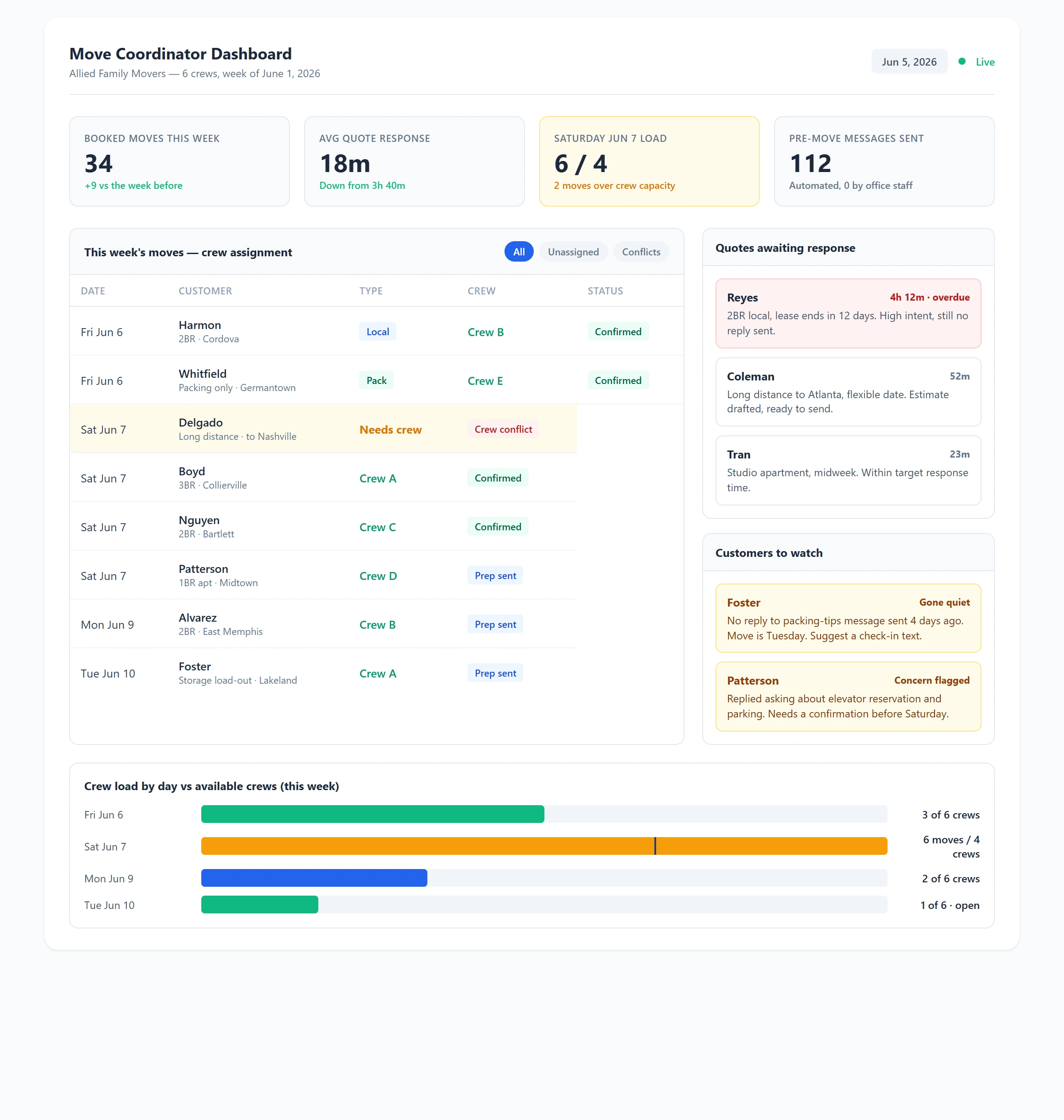
Move Coordinator Dashboard showing the week's moves, crew availability with an overbooked Saturday flagged, pending quotes that still need a response, and where each booked customer sits in the pre-move communication sequence. Download as PDF
View interactive version
Then there's the quote queue, which is where peak season is won or lost. Every incoming request lands here with a timer on it. A quote that's been sitting unanswered for two hours turns red, because in moving, the first clear answer usually gets the job. You stop losing work to a faster competitor simply because a request slipped down someone's inbox during a busy morning.
The customer side rounds it out. Each booked move shows where the customer is in the pre-move sequence and whether they've gone quiet or flagged a concern, so the people most likely to cancel are visible instead of invisible.
The communication sequence that runs without you
The dashboard tells you what's happening. The automation handles the part that would otherwise be a dozen phone calls a day nobody has time to make in June.
Once a move is booked, the system runs a timed sequence. Two weeks out, the customer gets packing tips and a checklist, which quietly cuts down on the day-of chaos that causes damage and delays. One week out, a reminder to reserve the elevator or the building's loading dock and to sort out parking for the truck, the logistics customers forget until the crew is circling the block. The day before, a confirmation with the crew's name and the arrival window, so nobody's sitting by the door at 8 a.m. wondering if they've been forgotten.
After the move, it keeps going. A check-in asks whether anything arrived damaged, which lets you get ahead of a claim before it turns into a one-star review. Then a review request goes to the customers who just had a good experience, while the memory is fresh. That post-job follow-up is the same engine behind the after-hours lead response we'd set up for emergency trades, pointed at the moving timeline instead of a 2 a.m. burst pipe.
None of that requires your office to send a single manual message. The customer feels handled at every step, which is exactly what reduces cancellations and damage claims, and it makes a six-truck operation feel as buttoned-up as the national chain down the road.
A Saturday in July with the dashboard open
It's 7 a.m. on the busiest Saturday of the month. Instead of working the phones to piece together where everyone is, you open the dashboard with your coffee.
Six moves are on the board. Five crews are green and assigned. One move, a long-distance to Nashville, is flagged: the crew you'd planned for it is still scheduled to finish a local pack-out that morning and won't make the start time. You see it at 7 a.m. instead of 10, so you swap the Nashville job to the crew that came free when a Friday move wrapped early, and the conflict disappears before it becomes a furious phone call.
Down in the quote queue, two requests came in overnight. One's been sitting four hours and the customer's lease ends in twelve days, which means they're booking today, with you or with someone else. You send the quote first thing, and the dashboard logs the response time. In the customer panel, a family moving next Friday has gone quiet since booking, no reply to the packing-tips message, so the system flagged them. A quick "just confirming we're all set for Friday, anything you need from us?" text settles it, and they don't drift to a competitor or cancel.
By 7:20 you've prevented a crew collision, answered the quote that mattered, and saved a wobbling booking. None of it took a phone call.
How it fits what you already use
If you're running on SmartMoving, Elromco, or a CRM you've half-outgrown, this dashboard sits on top of what you have rather than replacing it. It pulls in your bookings and crew schedule, layers on the quote timers and the communication sequence, and gives you the one combined view those tools don't quite offer. It's a custom tool built around how you already dispatch, not another platform you have to move your whole company into during your busiest month.
If you're still running off a spreadsheet and a group text, the dashboard becomes your system, and we'd build the booking-to-dashboard flow from whatever you use to take jobs now. The automation layer handles the timed messages, the damage check-ins, and the review requests, and it watches the quote queue so a request never sits long enough to cost you the job.
Setup runs about a week. We'd need your crew roster, your typical job types and how long each takes, and access to wherever your bookings live now. From there we build the schedule view, wire up the customer sequence, and set the rules that decide when a day is overbooked or a quote has gone cold.
What changes when you can see the whole season
The first thing that changes is your booking rate in the windows that matter. When every quote gets a fast, clear answer, you win more of the work you were already getting requests for, without spending another dollar on marketing.
Crew overtime drops because you stop discovering conflicts at the curb. Seeing an overbooked Saturday on Monday lets you fix it with scheduling instead of paying a crew time-and-a-half to clean up a double-booking. And the calmer the customer feels through the process, the fewer cancellations and damage disputes you eat, which protects both the revenue and the reviews that bring you the next month's jobs.
Most moving companies are quietly bad at communication after the deposit clears. Customers are anxious and hear nothing until the crew shows up. Filling that silence with a few well-timed messages is the cheapest way to look more professional than competitors twice your size, and it's the kind of thing that runs itself once it's built.
Where we'd start
If you run four or more crews and peak season feels like controlled chaos, the dashboard plus the communication sequence is one of the more direct AI builds to justify. The data already exists in your bookings and your dispatcher's head. The system just collects it and puts it where the whole team can act on it before things collide.
We'd usually start with the quote queue and the schedule conflict view, since those two protect revenue the fastest, then add the pre-move communication sequence once the booking side is humming. If you want to see what this would look like for your operation, with your trucks, your crews, and a real June Saturday, get in touch and we'll walk through it.

About the author
Zac Spencer is an online marketing specialist and the owner of Crave Media, based in Salt Lake City, Utah. Since 2013 he has managed hundreds of Google Ads accounts across dozens of industries — with budgets from a few hundred dollars to $250K a month — and founded Crave AI to build custom AI tools and automations for local service businesses.