

How to Automate Google Review Requests Without Being Annoying
Your Google rating decides who calls you. Someone searches "drain cleaning near me," sees one company with 200 reviews at 4.8 stars and another with 19 reviews at 4.4, and they don't think twice. The first company gets the call. Most of the time the work is just as good at both shops. The difference is that one of them asks for reviews and the other keeps meaning to.
Asking is the part that falls apart. You finish a job, you're already thinking about the next one, and the review request that was supposed to happen never does. So the obvious fix is to automate it. The catch is that automated review requests have a bad reputation, and it's earned. We've all gotten the text that shows up three days late, then again two days after that, then a third time "just checking in." That's not a review system. That's a customer slowly deciding you're a pest.
You can automate this and still sound like a human who respects people's time. The trick is in the timing, the wording, and knowing when to stop. This post walks through how to automate Google review requests for a service business the right way, and what we'd build to make it run on its own.
Timing beats everything else
If you get one thing right, make it timing. A customer is most likely to leave a review in the first couple of hours after the job wraps. The work is fresh, they're standing in a clean kitchen or a cool house, and they feel good about what they paid for. That goodwill has a short shelf life. By the next morning they're back at work and you're a line item on a credit card statement.
So the request needs to go out fast, usually within an hour of the job being marked complete. Not the next day. Not whenever the office catches up on Friday. The gap between "job done" and "please review us" is where most of your reviews quietly disappear.
There's a balance, though. Fast doesn't mean instant. If the text lands before your tech has pulled out of the driveway, it feels robotic, and the customer hasn't had a second to form an opinion yet. A short buffer, somewhere around 30 to 60 minutes after completion, hits the sweet spot. Long enough to feel intentional, short enough to catch them while they still care.
Pick one channel and respect it
Text messages get read. Around 90% of them get opened within a few minutes, which is why SMS beats email for this by a wide margin. Most people will skim a review request text and act on it or ignore it in the time it takes to email a longer message that's still sitting unread.
That said, the channel you use should match how you already talk to that customer. If your whole relationship has been over email, a sudden text can feel like you bought their number from somewhere. For most home service work, a text is fine and expected, because you've already been texting them about the appointment window and the "tech is on the way" update. The review ask is just one more message in a thread they already trust.
Whatever you pick, send from a real number tied to your business, and make sure replies go somewhere a person actually reads. Nothing kills goodwill faster than a customer texting back "thanks, you guys were great" to a number that's a black hole.
What the message should say
The wording is where most automated requests go wrong. They read like a form letter because they are one. A request that works does the opposite of a form letter in a few specific ways.
Keep it short. Use the customer's first name and a detail from the job so it's clearly about them, not a blast. Make the ask direct, give them the link, and get out of the way. Something like:
"Hi Marcus, this is Dana at Allbright Plumbing. Thanks for trusting us with the water heater today. If you've got 30 seconds, a quick Google review really helps our small team: [link]. No worries if not."
That message does a few quiet things right. It names a person and the actual job. It tells them exactly how long it takes. It frames the review as a help to a small local business, which is true and which people respond to. And it gives them an easy out, which paradoxically makes more people say yes, because there's no pressure to push against.
Avoid the things that make these texts feel like spam: all caps, exclamation points stacked three deep, "WE'D LOVE YOUR 5-STAR REVIEW!!!", or anything that tells them what rating to leave. Asking for five stars specifically is also against Google's review policies, so steer clear of it for that reason alone.
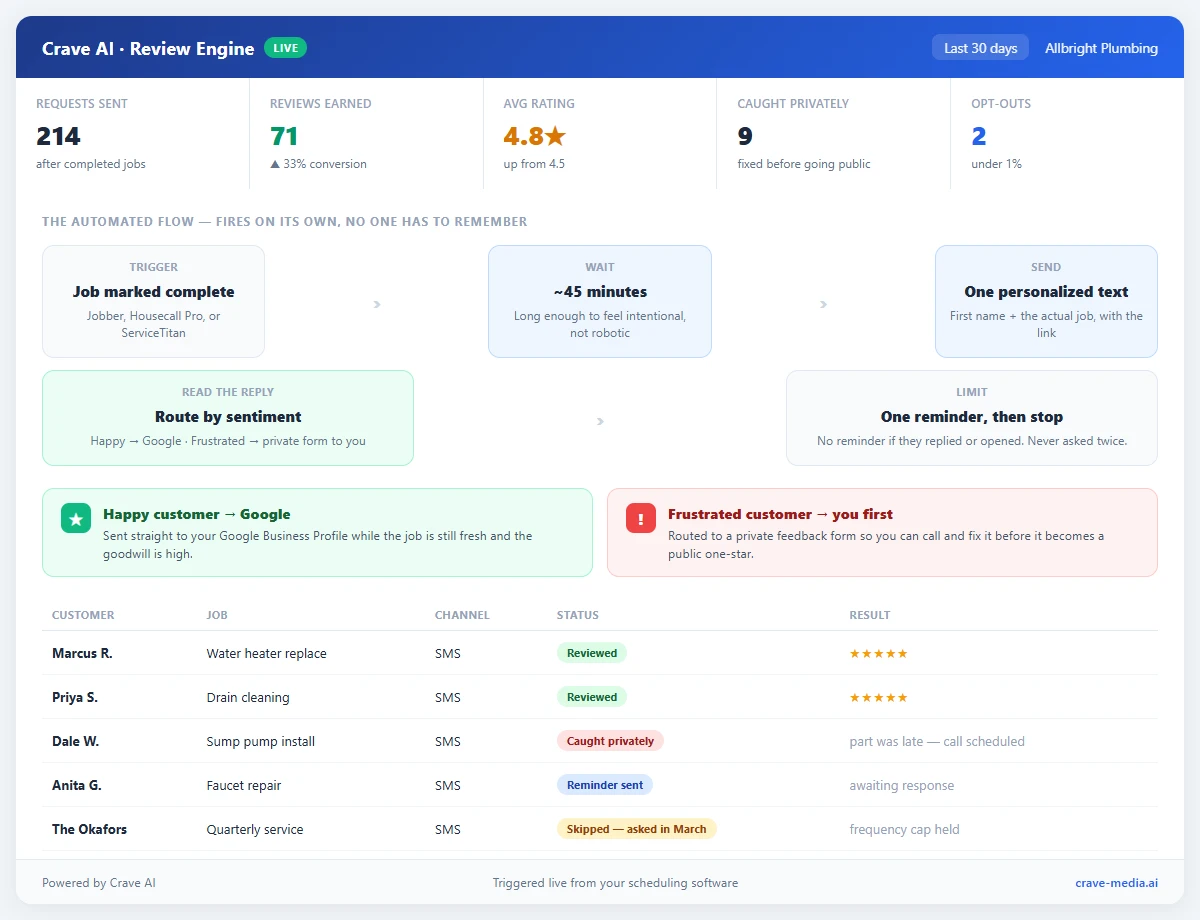
An automated review request flow for a service business: the request fires within an hour of a completed job, a single follow-up goes out only if there's no response, happy customers route to your Google profile while unhappy ones land on a private form first, and frequency caps stop anyone from getting texted twice. Download as PDF
View interactive version
Route happy and unhappy customers differently
Not every customer should be pointed straight at your Google profile. Some jobs don't go perfectly. The tech ran late, the part was backordered, something got missed. If you send that customer the same "leave us a review" link as everyone else, you're handing them a megaphone on your worst day.
A smarter setup asks a quick gut-check question first, or reads the reply. Happy customers get the Google link. Customers who sound frustrated get routed to a private feedback form that comes straight to you, so you can call them and fix it before it becomes a public one-star. This isn't about hiding bad reviews. It's about catching a problem while you can still do something about it, which usually turns an unhappy customer into a loyal one. The ones you never hear from are the ones who go public.
This kind of smart lead and customer follow-up is exactly where a little automation earns its keep. The logic runs in the background, every customer gets handled the right way, and nobody on your team has to remember to sort them.
Know when to shut up
The single biggest reason automated review requests feel annoying is repetition. One ask is a request. Three asks is nagging. The system has to know when to stop.
Our rule of thumb: send the initial request, then at most one gentle reminder a few days later if there's been no response at all. If they've already left a review, replied, or even opened the link, no reminder goes out. And once those one or two messages are done, that customer is finished. They don't get pulled into the next campaign. They don't get a "we miss you" text in three months. The system tracks who's already been asked and leaves them alone.
Frequency caps matter for repeat customers too. If you service the same house quarterly, that homeowner shouldn't get a review request after every single visit. Once or twice a year is plenty. Ask after every appointment and you've taught a good customer to dread your texts.
What we'd build for this
Most of the pieces here are simple on their own. Put together and running automatically, they're the difference between a trickle of reviews and a steady stream. What we'd build for a service business looks like this.
A trigger fires the moment a job gets marked complete in your scheduling software, whether that's Jobber, Housecall Pro, ServiceTitan, or a spreadsheet your office manager keeps. After a short delay, a personalized text goes out with the customer's name and the job detail pulled in automatically. The system watches for a response, routes happy customers to Google and unhappy ones to you, sends a single reminder only when it makes sense, and then stops. Everything lands on a dashboard so you can see requests sent, reviews earned, and where your rating is trending, without logging into five different tools.
Done this way, the ask never gets skipped because nobody has to remember it, and it never gets annoying because the limits are built in. It's the same principle behind the other workflows worth automating in a service business: take the human follow-through out of the equation for the stuff that's easy to forget, and let your team spend its attention on the work only people can do. If you want the deeper version of this specific flow, we walked through a full review automation build for a carpet cleaning company that goes job-by-job through the setup.
Reviews compound. A business that adds 15 or 20 honest reviews a month pulls away from a competitor sitting on the same 30 reviews they've had since 2023, and the gap shows up in the map pack, in your click-through rate, and eventually in the phone ringing. The work to get there isn't writing clever texts. It's building a system that asks every time and never overasks, then leaving it alone to run.
Set it and let it work
The companies winning on reviews aren't the ones with a marketing person hand-typing texts at the end of every day. They're the ones who set up the ask once, got the timing and the limits right, and then stopped thinking about it. Automate the request, route people by how the job went, cap how often anyone hears from you, and the reviews take care of themselves, without a single customer feeling worked.

About the author
Zac Spencer is an online marketing specialist and the owner of Crave Media, based in Salt Lake City, Utah. Since 2013 he has managed hundreds of Google Ads accounts across dozens of industries — with budgets from a few hundred dollars to $250K a month — and founded Crave AI to build custom AI tools and automations for local service businesses.