

Custom dashboard vs. built-in reports for field service
Marisol runs a six-van electrical contractor in Fishers, Indiana, on Jobber. Sunday night she sat down to set 2027 prices and stalled on the first line of her notepad: which kind of job made us money this year? She had revenue by month, a list of who owed her, and a hunch that EV charger installs were her best work. What she couldn't get without an export and an hour in Excel was a profit number by job type.
That's the night owners start comparing a custom dashboard vs. the built-in reports in their field service software. Selling custom dashboards is part of what we do, and our advice is still to write down the three questions you want answered every month before you pay anyone. If your job software's built-in reports answer two of them, don't build.
Marisol's reports answered about half of one. A pest control owner we'll get to below scored three for three, and he should keep his money.
What your built-in reports already cover
Start with what you're paying for, because there's probably more in there than you've opened.
The basics are covered on all three big platforms. Jobber splits its reports into financial, work, and client reports under Insights: projected income from invoices you've sent, aged receivables for anyone paying late, and timesheets for crew hours. Housecall Pro and ServiceTitan have their own versions. If your monthly questions are what's coming in, who's behind on paying, and how many hours the crew logged, you don't need anything new. Bookmark those reports and open them every Monday.
All three also track profit per job, which is where Marisol started:
- Jobber's job costing, on the Grow and Plus plans, figures labor from each employee's labor rate and their time entries on the job, adds line-item costs and expenses, and shows profit and margin per job in the One-off jobs report.
- Housecall Pro's job costing reports show revenue, labor, commission, materials, miscellaneous costs, gross profit, and margin, with the same filters and custom columns as its other job reports.
- ServiceTitan's Job Costing Summary report lists one job per row with labor pay, labor burden, materials, PO and equipment costs, gross margin, and a job type column.
ServiceTitan has one more piece worth knowing about. Its Marketing Pro package ties tracked calls to campaigns, jobs, and revenue. A ServiceTitan shop with Marketing Pro set up properly may already answer "which ads paid off" without any outside tool.
Where the built-in reports stop
Marisol's three questions ran into three different walls.
Margin by job type, drive included
Job costing works one job at a time. Marisol wanted it rolled up: all 118 EV charger installs this year against all 96 panel upgrades. The Jobber help article we read doesn't describe grouping the One-off jobs report by type, so she exported it and built a pivot table. Fine once. A chore every month.
The bigger problem was what the report didn't know. Jobber figures labor from time entries on the job, and her techs start the timer when they walk in the door. The 25-minute drive to a new build in Noblesville never lands on the job. EV chargers also need a permit inspection, her crew usually goes back to meet the inspector, and they'd been logging that visit to a general shop-time bucket. In the export, EV installs ran a 22% margin. When she added the inspection trip and both drives at her loaded labor cost of $58 an hour, they dropped to 14%. Panel upgrades held at 34%.
ServiceTitan's summary report doesn't have a drive-time column either, so a ServiceTitan shop with the same timer habit would get the same flattering 22%.
Questions that cross systems
Marisol spends about $2,900 a month on Local Services Ads and $1,800 on Google Ads. The spend lives in Google. The calls live in her phone system. The jobs and invoices live in Jobber. Her Jobber account doesn't hold her ad spend or her call log, so she can't say which dollars turned into paid panel upgrades and which turned into $79 diagnostic calls that went nowhere.
This is the usual reason a custom dashboard earns its cost: the question needs data from two or three places. It's also the gap Marketing Pro closes for ServiceTitan users, which is why we'd tell a ServiceTitan shop to check what it already owns before calling anyone.
Agreements and renewals
Marisol sells a $289-a-year generator maintenance plan and started 2026 with 140 of them. In Jobber those are recurring jobs, and the job costing article says it plainly: "Reporting is not available for job costs on recurring jobs." She can't see whether the plans make money after the spring and fall visits. She also can't pull, in one view, how many plans lapsed this year and which ones come due in January.
Check your own platform before you assume the worst here. Housecall Pro's service plan reporting shows plans sold and plan revenue by period, and ServiceTitan has membership tools of its own. In the help docs we read, we didn't find a report built around lapses, meaning who didn't renew and what they'd been paying.
Run the three-question test
Write your three questions in plain words, the way you'd ask your office manager. Each should have a number for an answer. "How's marketing doing" doesn't count. "What did each paid job cost us in ads, by source" does.
Then open your job software and give each question ten minutes, built-in reports only. Score it yes, partly (export plus spreadsheet), or no.
Marisol's scorecard:
- Which job type had the best margin this year, drive time included? Partly. She needed an export and a pivot, and the drive time wasn't in the data.
- What did each paid job cost in ads, by source? No.
- How many generator plans lapsed this year, and who's due in the first quarter? No.
Half of one out of three. That's a build.
Ray runs a three-truck pest control company on Jobber, and his three questions were different: what's coming in over the next 30 days from invoices we've sent, who's more than 30 days late, and how many hours did each tech log last month. The projected income, aged receivables, and timesheets reports answer all three in about four minutes. Ray shouldn't build anything. He should get someone to walk him through the Insights tab and spend the money on something else.
Why two out of three and not three? One missing answer is usually a quarterly export you can live with. Two missing means you're rebuilding the same spreadsheet every month and still guessing at the third.
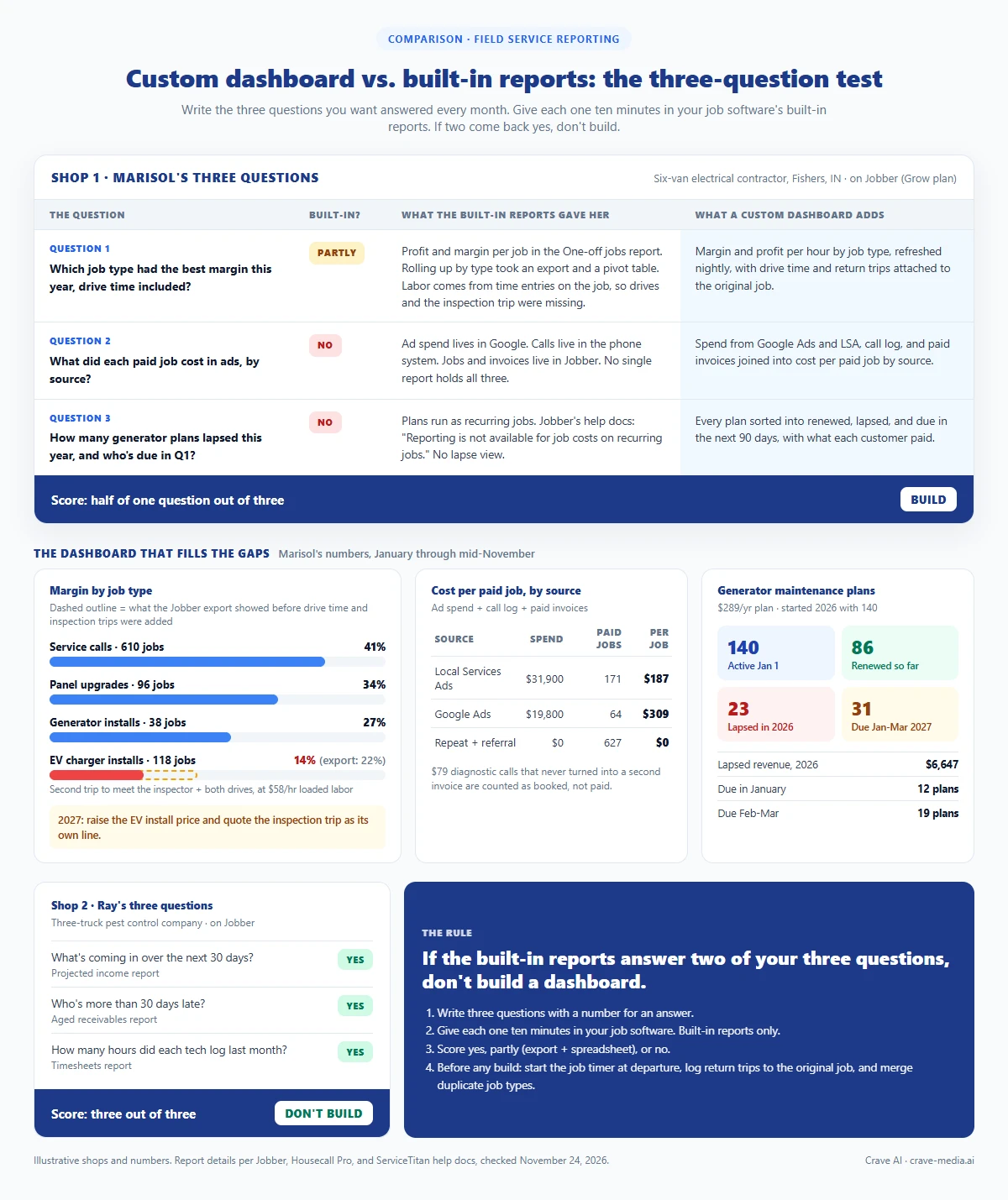
The three-question test for a custom dashboard vs. built-in reports: an electrical contractor's questions scored against what Jobber's reports answer, the dashboard view that fills the gaps, and a pest control shop that should keep using its built-in reports. Numbers are illustrative. Download as PDF
View interactive version
Fix the data before you build
A dashboard reads what your job software holds. It can't invent the drive time nobody logged.
Before we'd build anything for Marisol, she'd change two habits for a month. Techs start the job timer when they leave the last stop, and the inspection visit gets logged to the original install. She'd also clean up job types. Her account had "EV charger," "EV install," and "Charger - Tesla" as three separate line items for the same work, which splits one number into three small ones.
If the habits won't change, skip the dashboard. You'd be paying for a nicer-looking wrong number.
What the custom version looks like
For Marisol, it's one screen that refreshes overnight. It pulls jobs, line items, and time entries from Jobber, ad spend from Google, and the call log from her phone system. It shows margin and profit per hour by job type with drive time in, cost per paid job by lead source, and the generator plan list sorted into renewed, lapsed, and due in the next 90 days. The revenue tracker we designed for an HVAC company and the reporting dashboard for a general contractor are two fuller examples of the same idea, built for different trades.
Jobber stays the system of record, and the techs' phones don't change at all. The dashboard reads from Jobber; it doesn't replace anything in it. That only works if your plan lets an outside tool connect through the API, and plans differ. We went through which ones do in our post on adding AI to your job software vs. switching platforms.
Our breakdown of what custom AI tools cost puts a dashboard at a few thousand dollars, climbing with each data source it has to pull from. Marisol's pulls from three. The rest of what we'd build for an electrical shop, quoting and follow-up included, is on our page about AI tools for electricians.
Two out of three means don't build
Marisol's EV number was worth finding in November and not next August. At 14%, the 2027 install price goes up, and the inspection trip becomes its own line on the quote.
Her test takes half an hour. Write three questions on a notepad, give each one ten minutes in your job software, and count the yeses. Two or three, and the reports you already pay for are enough; learn them. One or none, and that notepad page is the first thing we'd ask to see. Look at the custom AI tools we build, or send us your three questions and we'll tell you which ones your software can already answer.

About the author
Zac Spencer is an online marketing specialist and the owner of Crave Media, based in Salt Lake City, Utah. Since 2013 he has managed hundreds of Google Ads accounts across dozens of industries — with budgets from a few hundred dollars to $250K a month — and founded Crave AI to build custom AI tools and automations for local service businesses.