

AI add-on vs. new field service software for your shop
Picture an HVAC and plumbing owner in Medina, Ohio. Call him Dave. Seven trucks, nine people, four years on Jobber, about 2,100 customers and 380 maintenance agreements in the system. At a trade event in October a ServiceTitan rep walked him through a demo full of AI agents, and he drove home wondering if his software was already behind.
That's the question behind most searches for an AI add-on vs. new field service software. Do you bolt AI onto the job software you already run, or move to a platform that ships more of it? We build custom tools that sit on top of these platforms, so we have a bias toward "keep what you have." We also think a few shops should switch, and we'll say which ones.
Our short answer for Dave: don't switch platforms to get AI. The long answer starts with what each platform's AI does right now, and then gets into the part of a migration nobody puts on the quote.
What your job software's AI does today
All three big platforms shipped real AI in the last couple of years. What follows is what each one says on its own pages when we checked in early November 2026. It changes every quarter.
Jobber's main piece is the AI Receptionist, launched in 2025. It answers calls and texts around the clock, books into your Jobber calendar using the online booking rules you already set up, creates work requests, and escalates on keywords you choose ("burst pipe," "no heat"). Jobber's pricing page lists it as a $29-a-month add-on on any plan, included on the top Plus plan. Usage limits apply past a set number of conversations, so read the fine print. Jobber also lists a "Receptionist Companion" as coming soon, which would listen in on calls you take and draft the quote.
Housecall Pro groups its features as an "AI Team." Analyst AI (reports from your job data), Coach AI, and Marketing AI come with every plan. CSR AI answers website chat, and its 24/7 call answering is a separate paid add-on that checks your live schedule and books into Housecall Pro.
ServiceTitan went biggest. At its Pantheon conference in October 2026 it opened up its Max package, which it calls an "agentic operating system," to residential contractors, with agents for things like invoice review, job documentation, collections, and spotting missed revenue. It also announced an Atlas mobile app for owners and Homh, a service meant to make ServiceTitan contractors bookable from AI assistants like ChatGPT and Gemini. Pricing isn't published. Some of the announced agents are marked coming soon.
Line the three up and the overlap is hard to miss. Answer the phone, book the job, write the follow-up, summarize the numbers. ServiceTitan has more agents and a bigger launch event. The center of every list is the same.
When the built-in AI is enough
For a lot of shops, the honest answer is to turn on what you're already paying for and stop there.
If your problem is missed calls after 5 PM, the receptionist add-on on your current platform solves it for roughly seven dollars a week on Jobber's listed price, and it books straight into the calendar your techs already use. If you want a quick read on revenue by month or which tech closes the most estimates, Housecall Pro's Analyst AI or Jobber's reporting probably answers it. We wrote more about this line in custom AI vs. off-the-shelf software: when the generic tool fits your workflow, use the generic tool.
Give it a 30-day test. Listen to ten recorded calls a week and count two things: calls that ended in a booking or a clean handoff, and calls that ended with a confused customer asking for a human.
The switching costs nobody quotes
A demo prices the new subscription. It doesn't price the move.
Start with Dave's 380 maintenance agreements, because that's where a migration hurts most. Each one has a renewal date, a visit schedule, a price, and often a card on file. The dates and prices can be rebuilt in the new system with enough spreadsheet work. The cards are the problem. Ask both vendors and your payment processor, in writing, whether stored payment methods can transfer. In many setups they can't, which means emailing hundreds of customers to re-enter a card. Every one of those emails is also a moment where a customer wonders if they need the plan at all. If even 30 of Dave's 380 drift off at $189 a year each, that's about $5,700 of recurring revenue gone, and no line on any quote covers it.
Job history is the next leak. Names, addresses, and phone numbers usually export fine. The notes a tech typed in the basement often don't: "Carrier 59SC5, installed 2019, filter is 16x25x4, shutoff is behind the dryer." Photos, attached PDFs, and equipment records can come over partially, get flattened into one text blob, or get left behind. Ask the new vendor to import 50 of your real customers as a test before you sign. A clean demo account tells you nothing.
Then the smaller stuff, which adds up:
- A few slow weeks while nine people learn new dispatch, invoicing, and a new tech app. That hurts more in November than in April.
- Booking links on your website and Google Business Profile, review request flows, the QuickBooks sync, and whatever someone wired up in Zapier. Each breaks quietly on cutover day, the way we described in our post on DIY automation vs. custom builds.
- Contract terms. Enterprise-tier platforms don't publish pricing, so ask directly about agreement length and onboarding fees, and count any overlap months on your current tool.
When a custom layer on top beats a migration
Sometimes the built-in AI doesn't cover what you need, and that's what sends owners shopping. Before you move platforms over one missing feature, ask whether the feature could sit on top of the software you already run.
Dave's list had three items. After-hours calls were covered by turning on the receptionist add-on. The second item, margin by job type, was the one the ServiceTitan demo sold him on. He wanted to know if his water heater swaps made more than his furnace repairs once parts and drive time came out. Jobber holds the raw data for that: line items, visit times, and the invoice. A small dashboard that pulls it nightly and does the math is a few weeks of work, similar to the revenue tracker we designed for an HVAC company.
The third item was renewals. He wanted the 60 agreements coming due in December to get a text in November, each one written from that customer's record ("Hi Linda, your comfort plan renews Dec 12. Same $189, and it still covers the spring AC tune-up and the fall furnace check. Reply YES to keep it going."). Anyone who replies with a question gets flagged to the office. It's one workflow. It reads agreement dates from Jobber, drafts the texts, and logs replies back to the client record.
Neither build asks anybody to learn a new dispatch board. Our breakdown of what custom AI tools cost has the ranges; a single workflow like the renewal texts usually lands at the low end.
The catch is access. A custom layer only works if your platform lets outside tools read and write your data.
- Housecall Pro's public API, per its own help docs, is available on the MAX plan. On lower plans you're limited to the integrations in its app store.
- Jobber has a GraphQL API with webhooks. Most apps connect through its App Marketplace, and its developer docs limit one-off custom integrations to approved customers and developers.
- ServiceTitan runs a developer program with APIs, but access is set up through ServiceTitan, so ask your account rep what your contract includes.
On Housecall Pro, the jump to MAX for API access is a real cost. Price it anyway before you price a migration.
When switching is the right call
There are good reasons to move, and they all live in the core software. They look like dispatch that can't handle your truck count, a commercial side with multi-site customers your current tool can't model, techs who refuse to use the mobile app, or reporting so thin that you're exporting to Excel every Monday. A shop that went from 6 trucks to 25 in three years has often outgrown a tool built for 6. At that size the bigger platform's AI is a bonus on top of a move you needed anyway.
The other good reason is that your vendor's product is clearly falling behind on basics, like texting customers, online booking, or payments. If those are missing in 2026, the AI is the least of it.
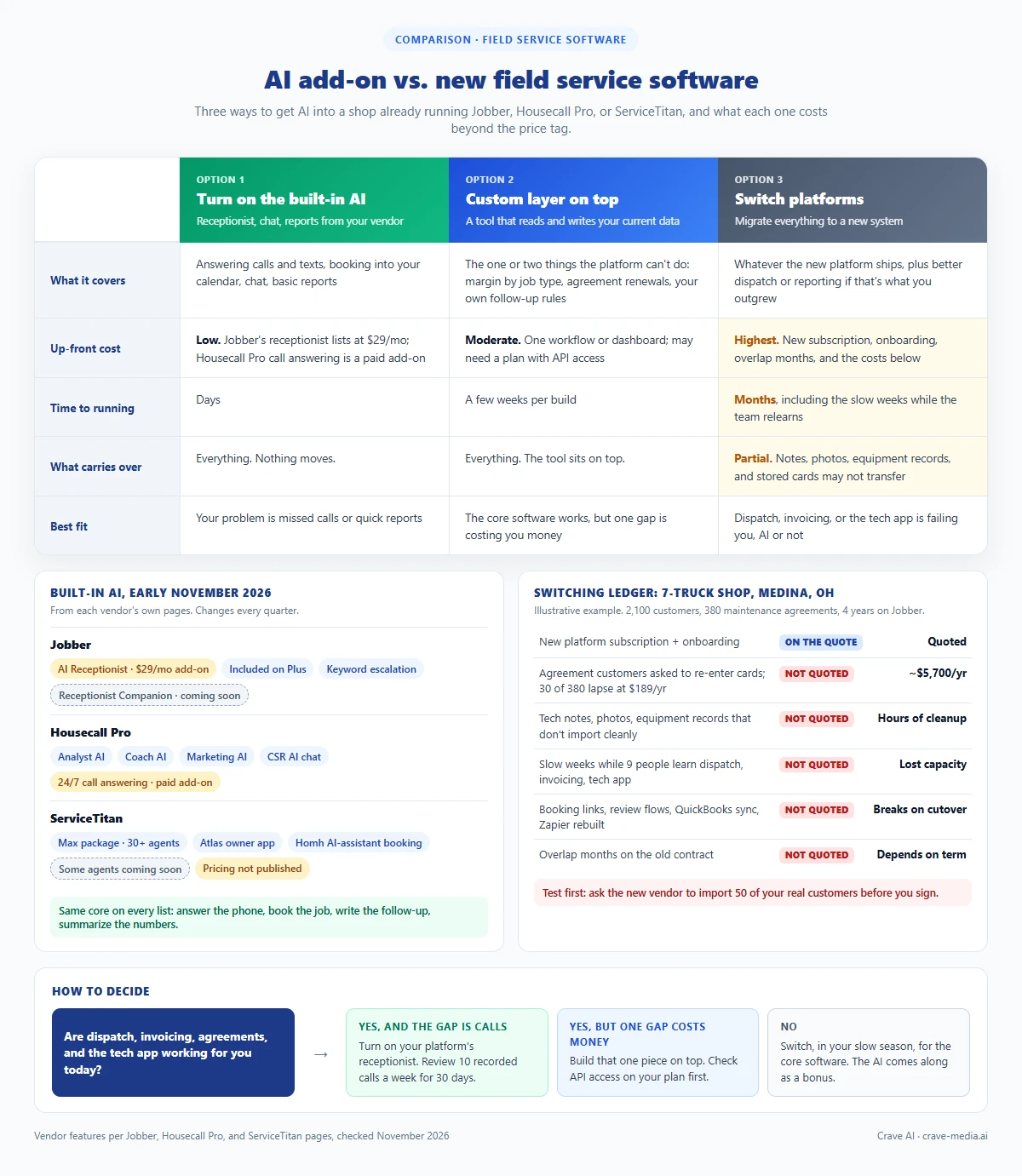
AI add-on vs. new field service software: what the built-in AI covers on Jobber, Housecall Pro, and ServiceTitan, what a migration costs beyond the subscription, and where a custom layer fits. Download as PDF
View interactive version
Integration questions to ask
Ask these before you pay anyone, for an add-on, a custom build, or a new platform:
- Which plan includes API access, and what does it cost to get there from where I am?
- Can an outside tool write back (add a note, create a job, update a client), or only read?
- Are there webhooks, so a tool hears about a new job or a paid invoice the minute it happens instead of checking every hour?
- What exports cleanly if I leave: job notes, photos, equipment records, agreements, stored payment methods?
- What do the AI add-ons cost per month at my call volume, not at the trial volume?
- Which announced AI features are live today, and which are "coming soon"?
Push hardest on number six. A feature on a roadmap slide is no reason to sign a multi-year contract.
If you're also weighing whether the gap is software or staff, our post on hiring another office person vs. buying AI tools walks through which admin work these tools handle well.
Switch for dispatch, not for the demo
The demo Dave saw in October was good. It's also a snapshot of a race. Jobber shipped its receptionist in 2025 and already lists the next piece as coming soon. Housecall Pro keeps adding teammates. Our bet is that most of what ServiceTitan showed has a Jobber and Housecall Pro version within a year or so, because all three are selling to the same shop owners. Migrate for an AI feature and you might pay the full cost of the move, lost agreements included, for something your current vendor ships next spring.
So we'd judge a platform on the boring parts. Does dispatch keep up with your trucks? Do your techs use the app without complaining? Do agreements renew on time? If yes, stay. Dave stayed on Jobber, turned on the receptionist the same week, and had the December renewal texts out by mid-November.
If you want help sorting out which of your gaps are platform problems and which are a small build, look at the custom AI tools we build or tell us what you're running today.

About the author
Zac Spencer is an online marketing specialist and the owner of Crave Media, based in Salt Lake City, Utah. Since 2013 he has managed hundreds of Google Ads accounts across dozens of industries — with budgets from a few hundred dollars to $250K a month — and founded Crave AI to build custom AI tools and automations for local service businesses.