

Holiday after-hours call coverage for a service business
The Monday after Thanksgiving last year, Jodi got to the office at Tall Oak Heating & Plumbing in Findlay, Ohio at 6:50 and found 43 voicemails. The greeting had said what most holiday greetings say: "We're closed for the holiday. Leave a message and we'll call you back." She started at the top. Message one was a Thursday-morning request for a water softener quote. Message nineteen, left Friday at 9:50 PM, was a woman whose furnace had quit with her mother staying over. By Monday she'd had another company out on Saturday.
The owner, Renee, was technically on call all weekend. She was also at her sister's in Columbus with her phone in her coat pocket.
Holiday after-hours call coverage for a service business is mostly about that weekend. A normal weeknight is a different, easier problem. What we'd build for a five-truck shop like Tall Oak is a "holiday mode" that runs on its own calendar, and with Thanksgiving nine days out there's still time to set it up and test it once. Shops that never get emergency calls can skip most of it, and we'll say which ones at the end.
Why a holiday closure breaks your normal after-hours setup
A regular evening is one night. The customer who calls at 9 PM on a Tuesday hears "we'll call you in the morning," and that's true. If you already have something like our 10 PM lead flow, it handles that night fine.
Thanksgiving is four days. Christmas lands on a Friday this year, so a shop that closes at noon on Christmas Eve is dark from Thursday afternoon until Monday, December 28. New Year's repeats the pattern a week later. "We'll call you back" on Thursday night means Monday, and the caller has no way of knowing that. So they call the next company.
The dates move every year, so last year's recorded greeting is wrong this year unless someone remembers to redo it. On-call changes by the day instead of the week. And whatever comes in over four days lands on one person's desk Monday morning, in the order it arrived, which is how a water softener quote got returned before a cold house.
How holiday mode works, step by step
Holiday mode is a schedule that flips your phones, texts, website banner, and Google hours into a different set of rules on specific dates, then flips them back. It reads from one calendar the owner fills in once.
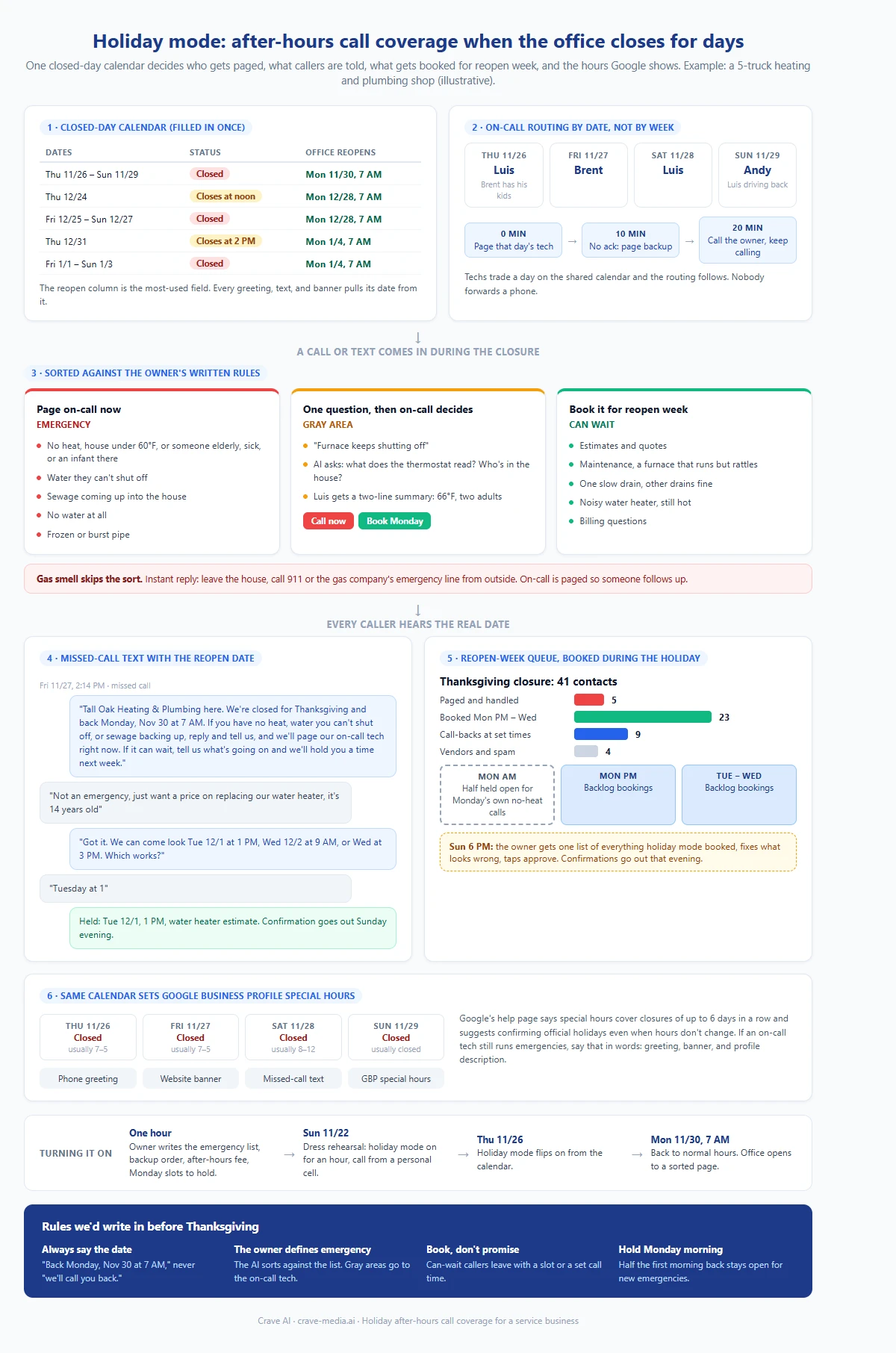
Holiday after-hours call coverage as one automation: the closed-day calendar drives who gets paged, what the customer is told, which calls get booked for reopen week, and the hours Google shows. Download as PDF
View interactive version
1. A closed-day calendar
Everything starts from a short list Renee fills in during the first week of November. For each date: closed, short hours, or open, and when the office reopens. For Tall Oak, which normally runs weekdays 7 to 5 and Saturday mornings, 2026 looks like this:
| Dates | Status | Office reopens |
|---|---|---|
| Thu 11/26 to Sun 11/29 | Closed | Mon 11/30, 7 AM |
| Thu 12/24 | Closes at noon | Mon 12/28, 7 AM |
| Fri 12/25 to Sun 12/27 | Closed | Mon 12/28, 7 AM |
| Thu 12/31 | Closes at 2 PM | Mon 1/4, 7 AM |
| Fri 1/1 to Sun 1/3 | Closed | Mon 1/4, 7 AM |
That reopen column is the most-used field in the whole system. Every message a customer gets during a closure pulls its date from it.
2. On-call routing by date
Most shops keep the on-call schedule in somebody's head or on a whiteboard, and it's usually "Brent has this week." Holidays don't work in weeks. Luis takes Thanksgiving Day because Brent has his kids, Brent takes Friday, and Andy covers Sunday so Luis can drive back from Toledo.
So the rotation lives on a shared calendar, one name per day, and the phone system reads it. An emergency pages that day's tech. If nobody acknowledges in 10 minutes, it pages the backup. At 20 minutes it calls Renee, and it keeps calling. When two techs trade a day, they change it on the calendar and the routing follows. Nobody has to remember to forward a phone.
How much you pay for holiday on-call is your decision, and so is whether you charge an after-hours rate. The automation just makes sure the page reaches the right person and that the customer hears the fee before the truck rolls.
3. Emergency or can-wait, in the owner's words
Renee writes the emergency list once, in plain words, and the AI sorts every call and text against it. Her winter-holiday version pages the on-call tech for no heat when the house is under 60 or someone elderly, sick, or very young is in it, for water they can't shut off, sewage coming up into the house, no water at all, and frozen or burst pipes.
Everything else books for reopen week: estimates, maintenance, a furnace that runs but rattles, one slow drain, a water heater that's noisy but still hot, billing questions.
Gas smells skip the sort. The reply goes out in seconds telling them to leave the house and call 911 or the gas company's emergency line from outside, and on-call gets paged so someone checks in after.
The gray area gets one question. "Furnace keeps shutting off" could go either way, so the AI asks what the thermostat reads and who's in the house, then sends Luis a two-line summary with two buttons, "call now" and "book Monday." He makes the call. A 66-degree house with two adults in it can usually wait until Monday, and Luis gets to make that call from his couch.
4. A missed-call text with the real reopen date
When a call goes unanswered, the missed-call text back trigger still fires. Holiday mode just changes what the text says:
"Tall Oak Heating & Plumbing here. We're closed for Thanksgiving and back Monday, Nov 30 at 7 AM. If you have no heat, water you can't shut off, or sewage backing up, reply and tell us, and we'll page our on-call tech right now. If it can wait, tell us what's going on and we'll hold you a time next week."
The date is doing most of the work. "We're closed for the holiday" leaves a customer guessing whether that means tomorrow or next Tuesday. "Back Monday, Nov 30 at 7 AM" lets them decide on their own whether they can wait, and most quote requests can.
The phone greeting and the website banner say the same thing, pulled from the same calendar, so nobody hears three different answers.
5. Book the can-wait calls during the holiday
This is the part we'd push hardest on. Every can-wait caller should leave the conversation with a time on the calendar, booked during the holiday itself.
When the customer who wants a water heater quote replies on Friday, the AI offers two or three real slots from the job software for that week. She picks Tuesday at 1. It's on the schedule as a hold. The calls that need a person, like a complaint about a past job or a $14,000 boiler replacement question, get a booked call time instead: "Jodi will call you Monday between 9 and 10."
Two rules keep that from turning into its own mess. First, Monday morning stays half empty. The first cold Monday after a holiday brings its own calls, and if the weekend backlog fills every slot by 8 AM, the new no-heat calls have nowhere to go. Second, nobody gets a confirmation until a person has looked. At 6 PM Sunday, Renee gets one list on her phone of everything holiday mode booked, fixes anything that looks wrong, and taps approve. Confirmation texts go out that evening.
For Tall Oak this Thanksgiving, that list might come to 41 contacts: 5 paged and handled, 23 booked into Monday afternoon through Wednesday, 9 call-backs with set times, and 4 vendors and spam calls. Jodi walks in Monday to a sorted page. The five emergency jobs from the weekend each have the tech's notes attached, so she can send the invoices and follow-up texts before 8.
6. Push the hours to Google
The same calendar should set your Google Business Profile special hours. Google's help page on special hours says they cover closures of up to six days in a row and suggests confirming hours for official holidays even when they don't change. Special hours can be entered by hand, through a bulk spreadsheet, or through the API, which is how holiday mode would set them without anyone logging in.
The awkward case is a shop that's closed but still sends a tech for emergencies. "Closed" is true for the office, so the emergency part has to be said in words, in the greeting, on the website banner, and in your profile's description if you run a real on-call line every holiday. How AI assistants read holiday hours is its own topic, and we'll cover it in an upcoming post.
What it takes to set up
The pieces are mostly ones you already pay for. Your phone system needs date-based routing, which most business VoIP services handle as a holiday schedule or time rule. You need a texting number the missed-call text can come from. The on-call rotation goes on a shared calendar, and your job software needs to let an outside system read open slots and place holds. Most of the big field service platforms have an API for that, but check that your plan includes it before anything else. Our automations work is mostly connecting those four things.
The rules take an hour with the owner. What's an emergency, who's backup, what the after-hours fee is, how many Monday slots to hold back. Write it down before anything gets built.
Then do a dress rehearsal on the Sunday before Thanksgiving. Turn holiday mode on for an hour, call your business line from a personal cell, and try "my furnace quit and it's 55 in here" and "I'd like a quote on a new water heater." Check that the right tech's phone rang, that the text had the right date, and that the quote landed as a hold. Then turn it off. You'll find the bugs while the office is still open to fix them.
If you already pay a human answering service for holidays, this sits behind it. The service picks up the phone. Somebody still has to know who's on call Saturday, tell the caller the real reopen date, and book the quote request instead of writing it on a pad. We break down that split in AI answering services vs. lead follow-up, and the booking half is what our lead follow-up service covers.
Shops that can skip most of this
If nothing you do is ever an emergency, you don't need on-call routing or an emergency sort. Painters, remodelers, window cleaners, and most landscapers can close for Christmas without anyone's house getting colder. Those shops need two things: a greeting and missed-call text with the real reopen date, and Google special hours set this week. That's about 20 minutes, and you can do it yourself today.
The full build pays off for heating, plumbing, garage door, water damage, and any trade where a holiday call can be a real emergency. Our industry notes put after-hours calls at around half for HVAC and plumbing, and a four-day closure stretches that after-hours window across the whole weekend, for your competitors too.
Give them the date
Take last year's holiday greeting and read it out loud. If it says "we'll call you back" without saying when, that's message nineteen in Jodi's pile, and that customer went with whoever could come Saturday.
Put Monday, November 30 at 7 AM in the greeting today, even if you build nothing else. If you want help wiring it to your phone system and job software, tell us how your holidays went last year and we'll tell you whether you need the full build or just the 20-minute version.

About the author
Zac Spencer is an online marketing specialist and the owner of Crave Media, based in Salt Lake City, Utah. Since 2013 he has managed hundreds of Google Ads accounts across dozens of industries — with budgets from a few hundred dollars to $250K a month — and founded Crave AI to build custom AI tools and automations for local service businesses.