

Invoice follow-up automation that gets you paid
There is a specific kind of dread that comes with calling a customer about an unpaid invoice. You did the work. They were happy with it. The money is owed, plainly and without dispute, and somehow you're the one who feels rude bringing it up. So the call slides to tomorrow, then to next week, and the invoice quietly turns 45 days old.
Invoice follow-up automation exists for exactly this. A small service business that sends 60 invoices a month and collects slowly can easily have $10,000 or more floating in the 30-to-60-day column at any given time. All of it is money you already earned and can't spend yet, and the only thing standing between it and your bank account is a series of reminders nobody on your team enjoys sending. This post walks through how the automated version works: the sequence, the wording, what happens when customers reply, and when it isn't worth building.
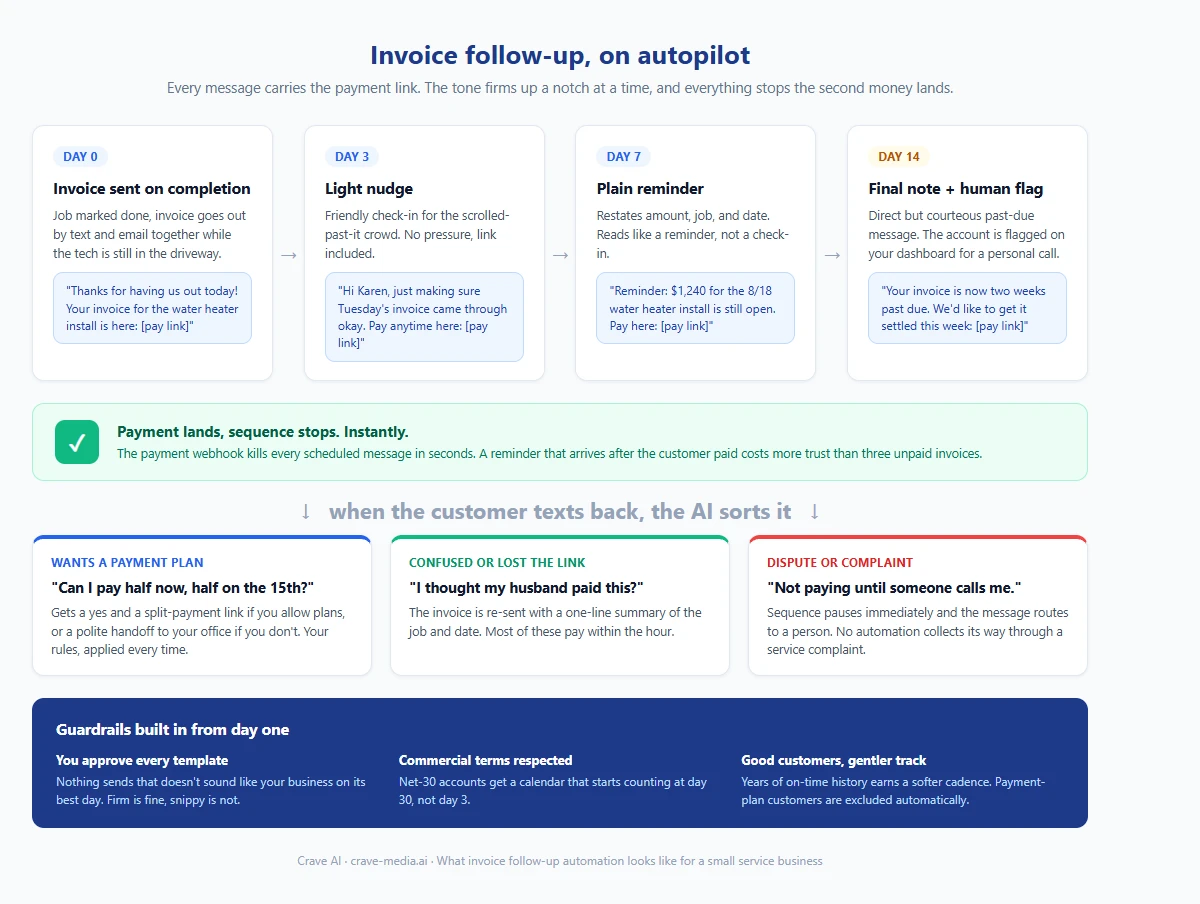
The full invoice follow-up sequence: every message carries the payment link, the tone firms up gradually, and the whole thing halts the minute money lands. Download as PDF
View interactive version
Why invoices go unpaid in the first place
Most late payers aren't deadbeats. The invoice landed in an inbox on a busy Tuesday, got scrolled past twice, and dropped out of the customer's head entirely. Some meant to pay and lost the link. A few are managing their own cash flow and will pay whoever asks most recently.
The pattern on your side of the fence is just as predictable. Nobody in a small shop owns collections. The office manager sends the invoice and moves on to scheduling. You notice the aging report at the end of the month, wince, and make two of the eight calls you meant to make. Follow-up happens in guilty bursts instead of on a schedule, and the customers who pay slowest learn that nothing much happens when they stall.
An automated sequence fixes the consistency problem and the awkwardness problem at the same time. The reminders go out every time, on time, in a tone you approved once. And because a system sent them, nobody on your team has to be the bad guy. Customers respond differently to a polite automated note than to a phone call that puts them on the spot, which is part of why this works better than the manual version it replaces.
The follow-up sequence, step by step
The build itself is one of the simpler automations we put together for service businesses. The sequence below is the shape we'd start with for residential work, adjusted from there.
Day 0, the invoice goes out
The moment a job is marked complete, the invoice goes to the customer by text and email together, with a payment link that takes two taps to finish. This step matters more than any reminder that follows it. A huge share of "late payment" problems are really "the invoice arrived three days late and only by email" problems. Send it while the tech is still in the driveway and you've already pulled the average collection time down.
Day 3, a light nudge
If the invoice is still open after three days, a short text goes out. Friendly, no pressure, link included. Something like: "Hi Karen, just making sure our invoice for Tuesday's water heater install came through okay. You can pay here whenever it's convenient." That message alone clears a big chunk of the forgot-about-it group.
Day 7, a plain reminder
A week in, the message drops the softness a notch and restates the specifics. Amount, job, date, link. Still courteous, but it reads like a reminder rather than a check-in. Most of the customers who were juggling cash flow pay here, because a business that reminds them weekly has moved to the front of their queue.
Day 14, the last automated touch
Two weeks out, the final automated message says the thing politely but directly: the invoice is two weeks past due and you'd like to get it settled this week. At the same time, the system flags the account on your dashboard so a human knows a call may be coming. That call, when it happens, is far less awkward than the cold version. The customer has heard from you three times and knows exactly why you're on the phone.
The most important rule in the entire sequence has nothing to do with sending. The instant a payment lands, everything stops. A reminder that arrives after the customer already paid does more damage than three unpaid invoices, because it tells them your right hand doesn't know what your left is doing. The payment webhook kills the sequence in seconds, not overnight.
When the customer texts back
Reminder texts get replies, and the replies are rarely a payment confirmation. They're "can I pay half now and half on the 15th," or "I thought my husband took care of this," or "the tech left a mess and I'm not paying until someone calls me."
An AI layer on the texting number sorts those the way your office manager would. The partial-payment request gets a yes and a split link if you've allowed that, or a polite handoff if you haven't. The confused-spouse message gets the invoice re-sent with a summary of the job. The complaint gets routed straight to a person, immediately, with the sequence paused. A payment dispute is a customer service problem wearing an invoice costume, and no automation should try to collect its way through one.
This is the same reply-handling machinery we use for appointment reminders that cut no-shows, and the rule there carries over unchanged: routine replies get handled, anything with heat in it goes to a human.
What it takes to set up
The system needs three connections. Your invoicing tool (QuickBooks, Jobber, Housecall Pro, and their neighbors all expose this), a texting number, and a payment processor that reports the instant a payment clears. If you already run something like missed call text back, the texting rails are already in place and this rides on them.
The part that takes real thought is the wording. You approve every template before anything sends, and the tone should sound like your business on its best day. Firm is fine. Snippy is not. We'd also set a few guardrails from the start: commercial accounts on net-30 terms get a different calendar that starts counting at day 30, repeat customers with years of on-time history get a gentler track, and anyone on a payment plan is excluded automatically.
Invoice chasing is also a textbook example of the sorting exercise from our hiring vs. automation math: it's the same task every time, on a schedule, with clear rules. That's the pile that automates well. You keep the judgment calls; the system keeps the calendar.
When this isn't worth building
If you send a handful of invoices a month and your customers pay at the counter, skip it. Collect-on-completion businesses with a card reader on every truck don't have this problem, and the better investment is getting payment links into the field so the job closes paid.
It's also not a fix for a pricing or quality problem. If a third of your invoices go into dispute, automation will surface that pattern faster, but the disputes themselves need a human and probably a process change. The sequence collects money customers agree they owe. It can't manufacture agreement.
For everyone in between, which is most service businesses running 30-day receivables they never chose, this is about the most direct line between "build an automation" and "see it in the bank account" that we know of.
The money is already yours
Nothing in this system wins you a new customer or books a new job. It just closes the gap between work you finished and money you can spend, and it does it without anyone on your team rehearsing an awkward phone call in the parking lot.
If your aging report has a 30-plus column you've stopped looking at, tell us what you invoice with and we'll map out what the sequence would look like on your accounts.

About the author
Zac Spencer is an online marketing specialist and the owner of Crave Media, based in Salt Lake City, Utah. Since 2013 he has managed hundreds of Google Ads accounts across dozens of industries — with budgets from a few hundred dollars to $250K a month — and founded Crave AI to build custom AI tools and automations for local service businesses.