

AI chatbot vs. contact form for a service business website
Every website vendor has the same pitch this year: put an AI chatbot on your service business website and it'll answer questions around the clock, capture more leads, and book jobs while you sleep. Some of that is true. A lot of it depends on what happens after the chat ends, which is the part the demo never shows you.
The plain old contact form has the opposite reputation. It's boring, it feels like 2012, and everyone assumes it's losing them business. Sometimes it is. But a short form wired to an instant text back books more jobs for most small service companies than a chat widget does, and it costs less to run.
We build the follow-up side of this, so we'll own that bias up front. We also think a chat widget earns its keep for some businesses, and we'll be specific about which ones. This post walks through how each tool behaves with a real lead, where each one wins, and what a badly set up bot costs you.
The difference is what happens after the tab closes
Picture a Tuesday in October, 9:15 PM. Two homeowners in the same zip code find your HVAC company's site because their furnaces won't light on the first cold night.
The first one fills out your form: name, phone, "furnace clicks but won't ignite," zip code. Your system texts her within a minute. "Hi Dana, this is Ridgeline Heating. Sorry about the cold house. Is the furnace clicking with no flame, or not doing anything at all?" She answers from the couch. By 9:22 she's booked for 8 AM.
The second homeowner opens the chat bubble instead. The bot is friendly and quick. It explains that a clicking furnace often points to an ignitor or flame sensor, tells him you service his area, and offers a booking link. He says he'll check with his wife. Then he closes the laptop.
That chat is over. No phone number, no thread on his phone, nothing anyone can follow up on. He got the better answer of the two homeowners, and at 7:40 the next morning he calls whichever company picks up first.
A chat session lives in a browser tab. A text thread lives in the customer's pocket, right next to the 6 AM reminder you're about to send.
Where a contact form wins
A form gets a bad rap because most of them are bad. Eleven fields, a required "how did you hear about us" dropdown, a CAPTCHA, and then a confirmation page that says someone will reach out within one to two business days. That form deserves its reputation.
A good one asks for four things: name, phone, what's going on, and zip code. It fits on a phone screen without scrolling. And the moment it's submitted, a real text goes out, the kind we described in our breakdown of missed call text back, which runs on the same trigger-and-reply idea.
That setup wins in a few situations:
- Your visitors already know what they want. A homeowner looking for gutter cleaning or a pest treatment doesn't have questions for a bot. They want a time slot.
- Most of your traffic is on phones. People on mobile fill out short forms and tap to call. They don't love typing a conversation into a tiny chat window.
- Your team is small. A form plus text-back has fewer moving parts to babysit than a bot that needs its answers checked.
- You care about speed more than anything else. As we covered in why lead response time decides who wins the job, the first company to respond with something useful usually gets the work. A form with an instant text is about as fast as it gets.
The form's weak spot is the visitor who isn't ready to hand over a phone number. Someone who wants to know if you work on tankless water heaters, or whether you drive out past the county line, won't fill out a form to ask. They leave.
Where an AI chatbot earns its keep
That half-ready visitor is where chat is strong. A good AI chatbot on a service business website answers the question-shaped traffic a form can't catch: service area, what brands you work on, whether you charge for estimates, how soon you can come out, a rough price range you've approved.
The clearest fit is a big, slow decision. Someone pricing a pool, a roof replacement, or a kitchen remodel is going to spend a few evenings on your site and your competitors' sites before talking to anyone, and they have real questions the whole time. Does the quote include permits? Do you finance? How long is the wait in spring? A bot that answers those at 10 PM keeps them on your site instead of the next tab.
It also helps if your office answers the same handful of questions all day. "Do you do commercial" fifteen times a week is a job for software. A plumbing outfit that gets a pile of desktop traffic after dinner is a decent candidate too. A pest control company whose customers mostly tap the phone number from Google Maps probably isn't.
Even then, the chat only books jobs if it does one thing early: gets a phone number and permission to text. The best bots ask within the first two or three messages, framed as a favor ("Want me to text you the available times so you don't lose this?"). Once that number is in, the chat hands off to the same text follow-up a form would have triggered. If your bot never asks, you've bought a nicer FAQ page.
What a bad bot costs you
A contact form that's bad is mostly invisible. A chatbot that's bad talks to your customers in your name.
The expensive failure is the bot that makes things up. Ask a generic AI model whether you do same-day service, or what a furnace repair runs, and unless someone has fenced it in, it will give a fluent, specific, wrong answer with total confidence.
Air Canada found out what that costs. In February 2024 a British Columbia tribunal ordered the airline to pay a customer after the chatbot on its website told him he could claim a bereavement fare discount after he flew, which the real policy didn't allow. Air Canada's defense was that the chatbot was responsible for its own statements. The tribunal held the company responsible for everything on its website, bot included. Your HVAC company is not an airline, but if your bot promises "$89 diagnostic, same day," expect a customer to screenshot it.
The loop ("Sorry, I didn't catch that. Could you rephrase?") is cheaper but common. Two of those and the visitor is gone.
On phones, watch the bubble itself. Plenty of widgets pop open on their own and sit right over the click-to-call button or the submit button on your form. You paid for that ad click.
Then check where captured chat leads go. A common setup mistake sends them to an email inbox nobody watches or a vendor dashboard nobody logs into. That's worse than having no chat, because the customer thinks they reached you.
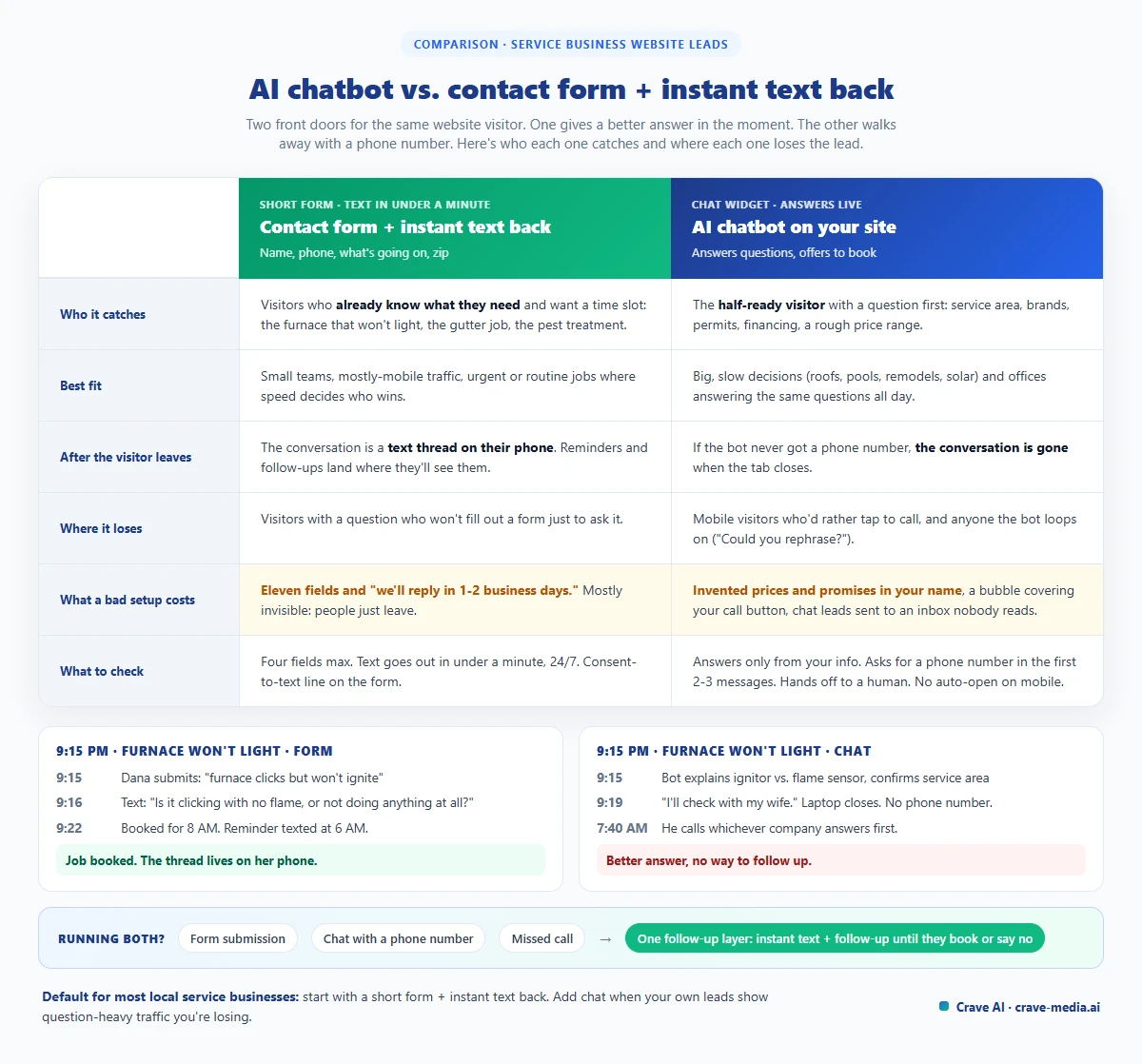
AI chatbot vs. contact form on a service business website: who each one catches, where each one loses the lead, and the setup that combines them. Download as PDF
View interactive version
How to decide for your own site
You don't need to guess. Pull three numbers from the last 60 days.
First, what time do your web leads come in? If a third or more land after 6 PM or on weekends, after-hours coverage matters, and either tool needs to respond without a human. Second, how fast does a form lead hear back from you today? If the honest answer is "next morning," fix that before you buy anything. A chatbot on top of slow follow-up just moves the leak. Third, read your last 30 form submissions and calls. How many were "come fix this" and how many were questions? Mostly fix-this means the form is your tool. Lots of questions means chat has something to do.
If you add a chat widget, treat the first month as a trial. Read every transcript once a week. Count how many chats ended with a phone number, and how many of those became booked jobs. If the bot is mostly answering hours and service area and then losing people, it isn't booking anything, and you can turn it off without losing much.
What to ask before you buy a chatbot
If you do go shopping, these questions sort the good tools from the demo-ware:
- Can I limit its answers to information I give it (services, area, hours, approved price ranges), and does it say "I'll have someone confirm that" when it doesn't know?
- Does it ask for a phone number early, and capture consent to text?
- Where does a captured lead go? It should land in the same place your form leads land, with the transcript attached.
- Can it hand off to a human mid-conversation during business hours?
- Can I turn off the auto-open popup on mobile?
- Will I get every transcript, and can I export them?
A lot of website builders and CRMs now bundle a chat widget for little or nothing extra. For plenty of businesses that bundled version is good enough, as long as it passes those six questions. Paying for something custom only makes sense when the bot needs to read from your real systems, like live schedule availability or job-specific pricing rules. That's the same line we drew in AI vs. software for a small business.
What we'd tell you to do
For most local service businesses with fewer than 20 people, start with a short form and an instant, real text back. It's cheaper and quicker to set up, and it covers the visitors who were ready to book anyway. Add a chat widget later if your own data shows question-heavy traffic you're losing.
If you run both, wire them into one follow-up system. A form submission, a chat that captured a phone number, a missed call: each should trigger the same quick text and the same days-long follow-up until the person books or says no. That layer is what we build with automated lead follow-up, and it's where most of the jobs get won. The front door just decides how the conversation starts.
Don't lump chat in with phone answering, either. An AI that picks up your calls solves a different problem, which we got into in AI answering services vs. AI lead follow-up.
Get the phone number
Try this tonight. Around 9 PM, pull up your own website on your phone, fill out the form like a customer with a broken furnace, and time how long it takes for anything to come back. Then open your chat widget, if you have one, and try to get it to tell you a price. Those two tests will tell you more than any vendor demo, and both come down to one question: did you end up with a way to reach the person tomorrow?
If you want a second set of eyes on where your website leads are going, tell us how they come in today and we'll show you where they're dropping.

About the author
Zac Spencer is an online marketing specialist and the owner of Crave Media, based in Salt Lake City, Utah. Since 2013 he has managed hundreds of Google Ads accounts across dozens of industries — with budgets from a few hundred dollars to $250K a month — and founded Crave AI to build custom AI tools and automations for local service businesses.