

How to track AI search traffic for a local business
Open Google Analytics, pull last month's traffic, and look for ChatGPT. For most local service companies the number is tiny. Eleven sessions. Maybe nineteen. Next to 2,400 visits from Google, it looks like proof that AI search is a story marketers tell each other and not something that touches a plumbing company in Ohio.
That number is real. It's also the smallest piece of the picture, and the piece most likely to talk you out of paying attention. When you try to track AI search traffic for a local business, you run into a problem the tools weren't built for: a lot of the customers AI sends you never visit your website at all. They read your name and phone number in the answer and call.
So you need more than one place to look. We use four, and none of them costs more than a modest monthly subscription. Analytics covers the people who click. A question at booking covers the people who call straight from the answer, and we'd bet that's the bigger group for most local businesses. Call tracking ties website visits to the phone, and a monthly round of test prompts shows whether you're getting named at all, usually a month or two before it turns up as revenue.
Why AI customers look like a rounding error
Think about how a customer uses ChatGPT to find a roofer. They ask who handles storm damage near them, get three names with a sentence about each, and often the phone number and hours are right there in the answer, pulled from the business's Google Business Profile and directory listings. If one of the names looks good, they tap the number. Your analytics never hears about it. Your phone does.
The people who do click through are a different crowd than Google searchers. They've already been told you're a reasonable choice and they're checking that your site agrees. That shows up in conversion rates. When Ahrefs looked at its own traffic in June 2025, AI search sent 0.5% of its visitors and 12.1% of its signups, which works out to roughly 23 times the conversion rate of regular organic search. Ahrefs sells SEO software, not water heater installs, so don't expect your numbers to match. The direction is the useful part: small volume, unusually warm visitors. We walked through why that happens in how AI search differs from Google search for a local business.
Then there's Google's own AI. Clicks from AI Overviews and AI Mode arrive with Google as the referrer, so analytics files them under plain organic search. Search Console lumps them into the regular Web report too. There's currently no clean way to separate "clicked a blue link" from "clicked a citation in the AI answer." Whatever the ChatGPT line in your analytics says, treat it as a floor.
What GA4 can show you
Start with the part that's free and already installed.
In May 2026 Google added an AI Assistant channel to GA4's default channel group. Go to Reports, then Acquisition, then Traffic acquisition, and it sits in the list next to Organic Search and Referral. Google's documentation says it covers visitors from sources like ChatGPT, Gemini, DeepSeek, Copilot, and Grok, and that it excludes AI Overviews and AI Mode. Two catches: it only classifies traffic going forward, so months before the change won't be relabeled, and the documented list doesn't mention Perplexity, so Perplexity visits can still land in Referral.
For a fuller view, switch the report to session source and look for these:
chatgpt.com(ChatGPT addsutm_source=chatgpt.comto the links it cites, so this one is the most reliable)perplexity.aigemini.google.comcopilot.microsoft.comclaude.ai
Some AI apps, especially on phones, strip the referrer entirely, and those visits fall into Direct. You can't recover them. You can sometimes spot the shadow: a jump in direct traffic landing on a deep service page that nobody would type from memory.
Don't stop at sessions. Mark your phone-number clicks and form submissions as key events in GA4, then look at what the AI visitors did. Twelve sessions with four calls is a better month than 300 Facebook sessions with one. And check which pages AI visitors land on. If they keep arriving on your pricing page or one particular service page, that's the page an assistant is citing, and it tells you what kind of content is earning you mentions. Our post on what ChatGPT and Gemini know about your business covers how to check whether what they're saying on the way in is accurate.
Add an AI option to the intake question
We'd set this up before touching analytics. For a local service business, the question at booking finds more AI-sourced customers than every analytics tool combined, because it's the only method that sees the person who called straight from the chat window.
We've complained before about contact forms with a required "how did you hear about us" dropdown, and we stand by it. Don't add a field that makes forms longer. Ask it out loud when someone books by phone, or send it as one optional tap in the confirmation text. Whoever answers your phones needs a short list to pick from:
- Google search
- Google Maps
- ChatGPT, Gemini, or another AI app
- Facebook or Nextdoor
- Friend or neighbor
- Saw the truck or a yard sign
- Past customer
The AI option has to be its own line. Lump it under "online" and you've learned nothing.
Expect the answers to be fuzzy. Plenty of people will say "I Googled you" after reading an AI Overview, and some won't remember. A good follow-up is "did you search, or did you ask something like ChatGPT?" It takes four seconds and people usually know.
The answer has to land in the job record, in your field service software or CRM, not on a sticky note by the phone. That's what lets you tie it to revenue. Say a remodeler books 140 jobs in a quarter and nine of them say an AI app sent them. That's 6% of jobs, from a channel GA4 showed as 31 sessions. If the average job is $8,000, those nine are worth $72,000, and nobody in the office would have guessed it from the traffic report.
Call tracking without breaking your listings
Call tracking with dynamic number insertion swaps the phone number shown on your website based on where the visitor came from. Set one tracking number for visitors arriving from AI sources and every call on it is a call from someone who clicked through from an AI answer. Services like CallRail do this for a monthly fee.
The trap is putting tracking numbers in the wrong places. AI assistants build their picture of you from your Google Business Profile, directories, and review sites, and they cross-check them. A different phone number on Yelp, your profile, and your website looks like three different businesses or one sloppy one. Keep your real main number on every listing, as we covered in why your Google Business Profile feeds AI answers, and run tracking numbers only on your own site.
That means calls placed straight from the AI answer still ring your main line, unlabeled. That's fine; the intake question is there for them. If you get fewer than about a hundred calls a month, you can probably skip this step and let the intake question do the work.
Run the same prompts every month
Everything so far counts customers who already showed up. Prompt checks show what's coming. If assistants start naming you in March, the calls follow in April or May.
Write eight to ten prompts the way your customers would type them. Mix the kinds of questions:
- "Best plumber near Westerville for a water heater replacement"
- "Who does emergency drain cleaning on weekends in Dublin, Ohio"
- "How much does a tankless water heater cost in Columbus"
- "Is [your company] any good"
Run each one in ChatGPT, Gemini, Perplexity, and Google's AI Mode, in a fresh chat, on the same day each month. Log four things: whether you were named, where in the list, whether the facts about you were right, and which competitor got named instead when you weren't. Answers vary from one run to the next, so run your most important prompts twice.
A spreadsheet works. The AI search optimization checklist covers what to fix when a prompt keeps naming someone else.
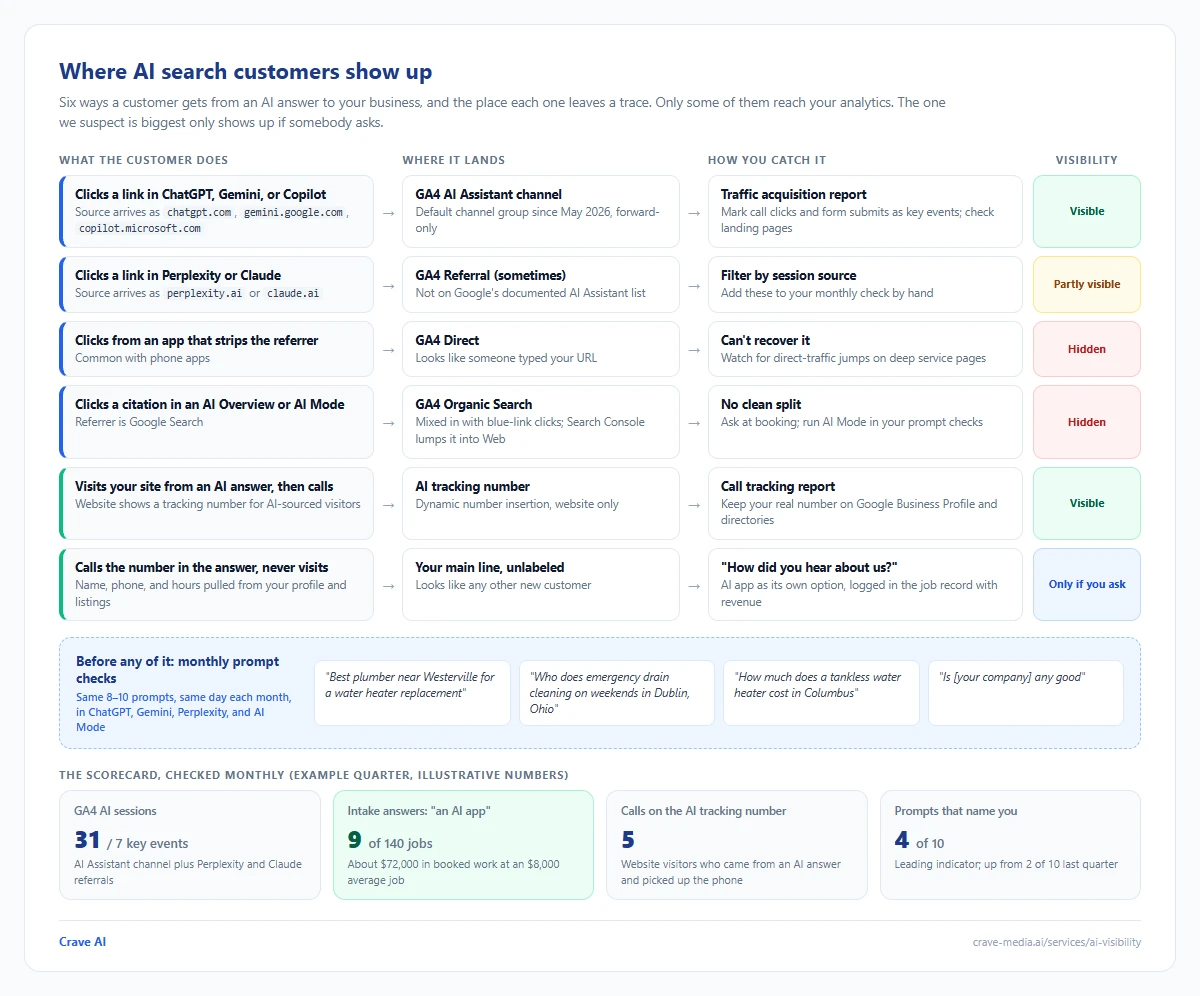
Where AI search customers show up. Some paths land in GA4's AI Assistant channel, some hide in Referral, Direct, or Organic Search, and the customer who calls straight from the answer only shows up if someone asks at booking. Download as PDF
View interactive version
Reading the four numbers together
Once a month, put the four numbers on one page: AI Assistant sessions and key events from GA4, intake answers that said AI (with revenue attached), tracked calls from AI visitors, and how many of your test prompts named you. Judge them over a quarter, because a local business has too few AI customers for month-to-month swings to mean anything.
Prompts naming you more often while intake stays flat usually means you're on the list but not getting picked, which points at reviews and how your profile reads. Intake climbing while GA4 stays flat means people are calling from the answer without visiting, which is normal and means your listing data is doing its job. GA4 visits rising with no calls means the landing page loses them once they arrive.
None of this needs custom software for a small shop. A spreadsheet and fifteen minutes a month will do. Once you're running multiple locations or a lot of call volume, pulling the four sources into one dashboard saves real time, and it's part of how we report results in our AI visibility work.
Ask the person on the phone
GA4 sees the clicks. It will never see the woman in Westerville who asked Gemini for a plumber at 9 PM, read your name and number in the answer, and called from the couch. On your books she looks like any other new customer, unless somebody asks.
So start with the cheapest tool on the list. This week, have whoever answers the phone ask every new customer how they found you, with the AI apps as their own option, and type the answer into the job record. By mid-January you'll have a real count with dollar amounts next to it. If you'd like help reading what turns up, get in touch.

About the author
Zac Spencer is an online marketing specialist and the owner of Crave Media, based in Salt Lake City, Utah. Since 2013 he has managed hundreds of Google Ads accounts across dozens of industries — with budgets from a few hundred dollars to $250K a month — and founded Crave AI to build custom AI tools and automations for local service businesses.