

How to automate customer intake for a service business
A homeowner in Mason, Ohio fills out your website form at 9:40 on a Sunday night. Water heater's leaking. Monday at 7:15 she texts the same thing to your cell, with two photos, because nobody wrote back. At 8:02 she calls, and your office manager writes her name and number on a sticky note while she talks.
By lunch that one job has been typed four times. Once into the job software from the form email, once more because nobody noticed the text was the same person, once onto the calendar, and once into a text to the tech with the address. The photos are still sitting on your phone. And now there are two customer records for her, one as "Karen Mills" and one as "Karen Mills-Ortega," and next spring's maintenance reminder will go to the wrong one.
That Monday is what you're fixing when you automate customer intake at a service business. Every request, whatever door it came through, becomes one job record that a person checks instead of builds. Below is how we'd set it up, step by step, and when it's more machinery than a shop needs.
Where the retyping happens
Most shops don't think of intake as a process. It's just "answering the phone." But if you watch an office for a week, the same customer details get copied by hand at three or four points:
- Form submissions arrive as an email, and someone copies each field into the job software.
- Voicemails get listened to, then summarized by hand.
- Texts and photos live on whoever's phone they hit, and rarely make it onto the job.
- Returning customers get re-entered from scratch because searching for them takes longer than typing.
The minutes add up. What costs real money is the errors that come with hand-copying. A transposed house number sends a tech to 4127 instead of 4172. A job typed as "water heater" turns out to be a tankless unit, and the tech shows up without the right parts. A duplicate record splits a customer's history in half, so the tech doesn't see the note that the shutoff valve is behind the dryer.
How customer intake automation works
The automated version has five steps, and they run in the same order for every request, whether it shows up at 9:40 on a Sunday or 8:02 on a Monday. Most of the pieces already exist in software you might own.
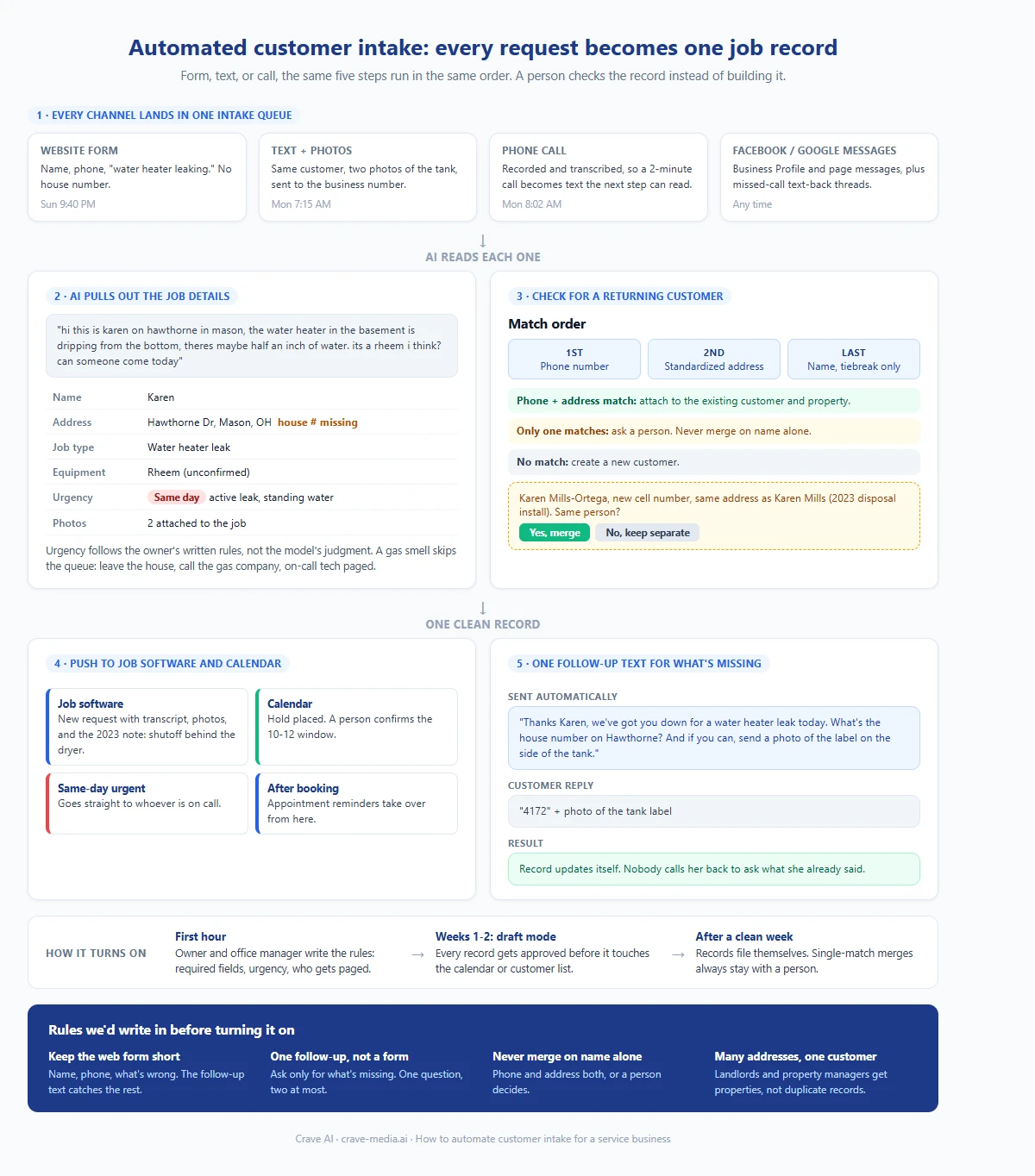
How to automate customer intake for a service business: every channel feeds one inbox, AI pulls out the job details, returning customers get matched instead of duplicated, the job lands in your software and calendar, and anything missing gets one follow-up text. Download as PDF
View interactive version
1. Every channel lands in one place
Website forms, texts to your business number, Facebook and Google Business Profile messages, and phone calls all feed a single intake queue. Calls are the messy channel. The system records and transcribes them, so a two-minute conversation becomes text the next step can read. If you already run missed call text back, those text threads land here too.
2. AI pulls out the job details
This is where the retyping goes away. A model reads the message, the transcript, or the form, and fills in the fields your job software needs: name, service address, job type, equipment details if mentioned, urgency, preferred time window, and any photos attached.
People don't write in fields. A real text looks like this:
"hi this is karen on hawthorne in mason, the water heater in the basement is dripping from the bottom, theres maybe half an inch of water. its a rheem i think? can someone come today"
From that, the system fills in: Karen, Hawthorne (street number still missing), Mason. Job type: water heater leak. Brand: Rheem, unconfirmed. Urgency: same day, active leak. Photos: two, attached to the job.
Urgency rules come from you, not from the model's judgment. We'd write them out with the owner: "no heat" when it's below 40 degrees is same-day, standing water is same-day, "making a noise" is next available. And a few phrases skip the queue entirely. A mention of a gas smell gets an immediate reply telling the customer to leave the house and call the gas company's emergency line, and it pages the on-call tech.
3. Check for a returning customer
Before creating anything, the system looks for a match. Phone number first, because it's the most reliable thing people give you. Then the service address, cleaned up to a standard format so "4172 Hawthorne Dr" and "4172 Hawthorne Drive" count as the same house. Name similarity comes last and only breaks ties.
We'd never let it merge on name alone. There are a lot of Mike Johnsons in Warren County. If the phone and address both match, it attaches the request to the existing customer. If only one matches, a person gets a one-tap question: "Karen Mills-Ortega, new cell number, same address as Karen Mills. Same person?"
Watch for landlords and property managers. One customer, eleven addresses. Most job software already handles this (Jobber, for example, lets one client have multiple properties), so the match should land the new request under the right property instead of making a new customer.
4. Push the job to your software and calendar
Once the record is clean, it goes where your office already works. A new request or job in your field service software with the transcript and photos attached, plus a hold on the calendar. Same-day urgent jobs go to whoever's on call. Everything else waits for a person to confirm the slot, then the appointment reminders take it from there.
5. One follow-up text for what's missing
If something required is missing, the customer gets one text asking for exactly that. Not a link to a nine-question form. One question, or two at most:
"Thanks Karen, we've got you down for a water heater leak today. What's the house number on Hawthorne? And if you can, send a photo of the label on the side of the tank."
When she replies "4172" with a photo, the record updates itself. No one has to call her back and ask what she already said.
Why we'd keep the web form short
The tempting fix for missing info is a longer form. Add fields for address, equipment brand, model number, photos, "describe the problem." Every required field you add gives somebody one more reason to close the tab and call the next company on the list.
We'd do the opposite. Ask for name, phone, and what's wrong. Let the extraction step pull what it can from the description, and let the follow-up text catch the rest after the lead is already yours. Asking for a model number before you've even replied puts the work on the wrong person. Our post on chatbots vs contact forms lands in the same place: a short form wired to an instant text back books more jobs than an eleven-field one.
What one Monday looks like
Back to the Mason plumber, now running three trucks with intake automated.
Sunday 9:40 PM, Karen's form comes in. The system extracts a water heater leak, finds no match for her phone number, and creates a new customer and request. Her form didn't include a house number, so she gets the follow-up text that night. She doesn't answer.
Monday 7:15 AM, she texts the photos. The phone number matches Sunday's request, so the photos attach to the same job instead of starting a second one. 7:16, she answers the house number. The address now matches an old record from 2023, a disposal install under "Karen Mills" with a different phone. The office manager gets the merge question at 7:30 when she sits down, taps yes, and the tech can now see the 2023 note: shutoff is behind the dryer.
At 8:02, Karen calls anyway, because people do. The office manager pulls up a job that's already built, confirms a 10-to-noon window, and the call takes ninety seconds. Her address was typed once, by her, on Sunday night.
What it takes to set up
Three connections do most of the work. Your phone system needs call recording and transcription, which a lot of business VoIP services offer as a setting or a cheap add-on. Your job software needs an API or an integration path. Jobber, Housecall Pro, and ServiceTitan all have one, though access can depend on your plan. And your forms and message channels need to send into the same queue, which is usually a webhook.
On recording calls: Ohio is a one-party consent state, so recording your own business calls is generally allowed here. If you take calls from customers in states that require everyone's consent, a short "this call may be recorded" greeting covers you. Ask your attorney if you're unsure.
The rules have to come from you. Which fields each job type needs before it can be booked, what counts as urgent, who gets paged at night, which techs can take which jobs. We'd spend an hour with the owner and office manager writing those down before building anything.
Then we'd run it in draft mode for two weeks. The system builds every record, but a person approves each one before it touches the calendar or the customer list. You'll find the job types it mislabels and the merge questions it asks too often. Once the drafts go a week without corrections, it starts filing them on its own. Merges on a single match always stay with a human.
Intake is one of the workflows most service businesses should automate first, because everything downstream (scheduling, reminders, invoices, reviews) runs on the record it creates. A bad record at the start gets copied into every step after it. It's also the kind of connected setup our automations service is built around.
When to skip it
If you get fewer than about fifteen new requests a week, mostly by phone, and the owner or one office person answers them all, don't build this. One person typing fifteen jobs isn't the problem worth solving. Use the request form built into your job software, make sure form submissions create a request directly instead of an email, and save a contact's photos to the job before you close the text thread. That gets you most of the way for free.
The math changes when you have several channels, more than one person taking calls, or a spring rush where requests double. That's when the duplicates and the lost photos start costing jobs. If you're on the fence, our DIY automation vs custom build breakdown has a quick way to tell whether a Zapier-style setup will hold or whether you need something built.
Type it once
Pick a job from last week and count how many times someone in your office typed that customer's address. Then ask which of those copies the tech drove to.
In the Sunday-night example it was four, and the tech's copy was the last one made, by the person in the biggest hurry. The goal here is one: the customer types it, the system files it, and a person glances at it before the truck rolls. If you want help mapping your channels and job software, tell us how requests come in today and we'll tell you whether this is worth building or whether your job software's own form will do.

About the author
Zac Spencer is an online marketing specialist and the owner of Crave Media, based in Salt Lake City, Utah. Since 2013 he has managed hundreds of Google Ads accounts across dozens of industries — with budgets from a few hundred dollars to $250K a month — and founded Crave AI to build custom AI tools and automations for local service businesses.