

Winning back past customers with automated reactivation
Somewhere in your job history is a customer who paid you $600, told the neighbors you did great work, and hasn't heard from you in two years. Multiply them by a few hundred and that's the file most service businesses are sitting on while they spend real money on strangers.
Customer reactivation automation works that file for you. It watches your job history for customers who've gone quiet, sends them a short message at the moment they're likely to need you again, and books the ones who respond. No ad spend, no lead forms, no introducing yourself. These people already know the truck.
Below: what triggers a message, what the sequence says, the list cleanup that has to happen before anything sends, and the businesses that shouldn't bother with this at all.
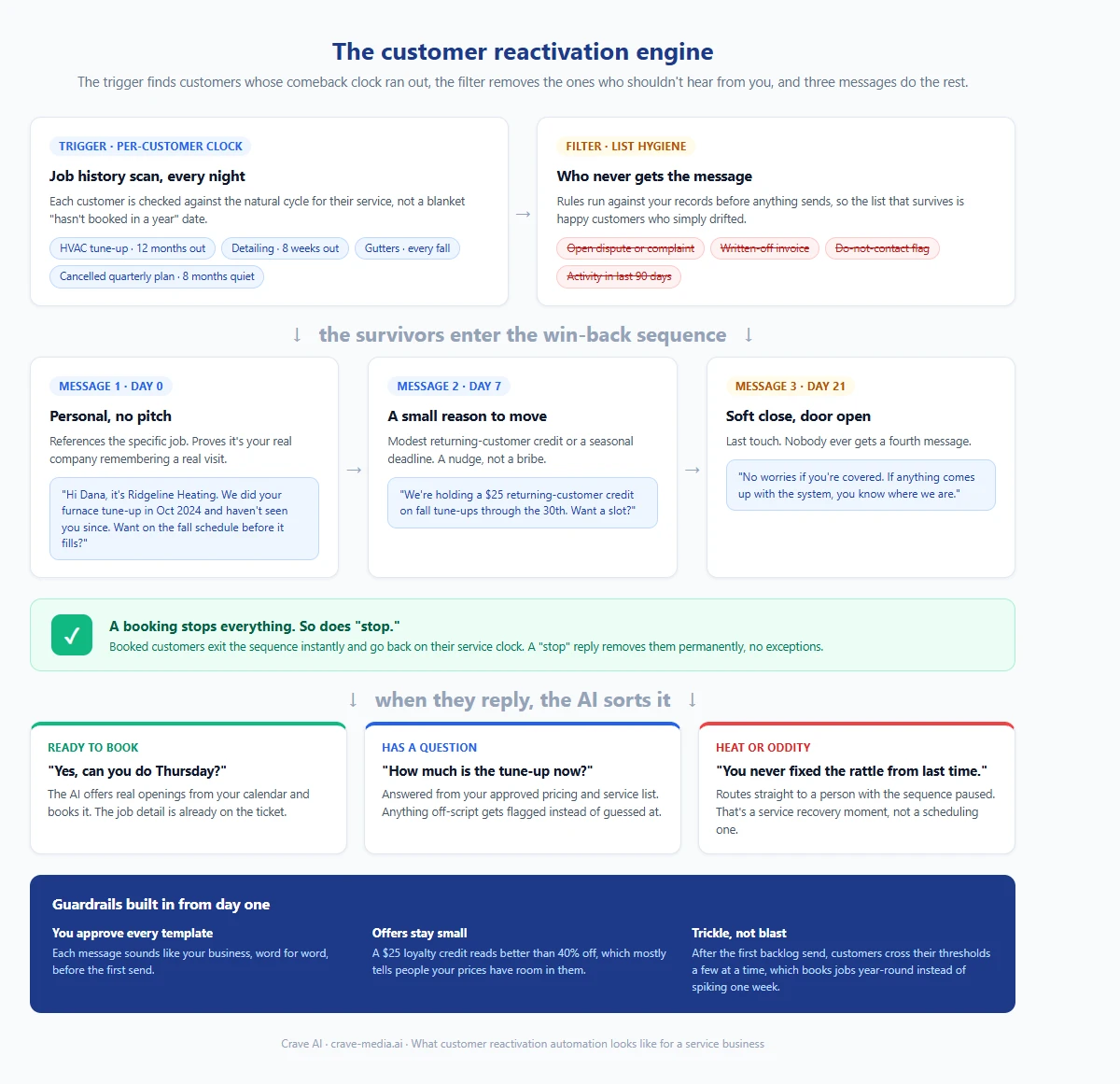
The reactivation engine end to end: the trigger finds dormant customers, the filter removes the ones who shouldn't get a message, and the sequence stops the moment someone books. Download as PDF
View interactive version
Why good customers go quiet
Almost none of them left because something went wrong. They forgot. You cleaned their carpets in the spring of 2024, they were happy, and then life moved on. When the carpets got bad again, they typed "carpet cleaning near me" like everyone else, and whoever ranked that day got the job you'd already earned.
The forgetting runs in both directions. The customer forgot your name, and your business forgot the customer existed, because nobody's job is to read old invoices looking for people to call. New leads announce themselves. Past customers just sit in the software, and the software never taps you on the shoulder.
That's the whole problem reactivation solves. It's a tap on the shoulder, automated, on both sides of the relationship.
What counts as dormant
The lazy version of this automation blasts everyone who hasn't booked in a year, in January, because that's when someone remembered the list. The useful version triggers per customer, based on what you know about their service.
Every trade has a natural comeback clock. An HVAC customer who hasn't had a tune-up in twelve months is due. A detailing customer runs on a six-to-eight-week cycle. Gutter cleanings come around every fall. A pest control customer who cancelled a quarterly plan eight months ago is overdue in a way their neighbor on the active list isn't. The trigger should fire when that customer's clock runs out, not when the calendar hits a date you picked for the whole list.
Job history sharpens this further. A customer whose water heater you replaced six years ago is approaching the age where the anode rod matters. The system knows the install date. A person would never remember to check; the automation never forgets to.
Clean the list before anything sends
This is the unglamorous step that decides whether the campaign reads as thoughtful or as spam, and it has to happen before message one.
Some people should never get a win-back text. The customer whose complaint you ate the cost on. The invoice you wrote off. The one who left a two-star review, and the one who told your office manager to stop texting. Anyone with an open quote or an active job sits out too, because "we miss you!" landing mid-project makes the whole operation look like it isn't paying attention.
The filter is a set of rules run against your records: exclude open disputes, exclude written-off balances, exclude do-not-contact flags, exclude anything with activity in the last 90 days. Ten minutes of rule-writing up front, and the list that survives is people who genuinely liked you and genuinely lapsed. That list responds well.
The sequence, message by message
Three messages, spread over about three weeks, and the tone matters more than the timing.
The first message doesn't sell. It references the specific job and asks a service question: "Hi Dana, it's Ridgeline Heating. We did your furnace tune-up in October 2024 and haven't seen you since. Want us to get you on the fall schedule before it fills?" The job detail does the heavy lifting. It proves this is your actual heating company remembering an actual visit, and for a surprising share of the list, that alone is the tap they needed.
A week later, the second message adds a reason to move: a modest returning-customer discount, a seasonal deadline, a slot that opened up. Keep it small. The person you're texting already trusts you, and a $25 loyalty credit reads better than 40% off, which mostly signals that your regular prices have room in them.
The final message is a soft close and a door left open. Something like: "No worries if you're covered. If anything comes up with the system, you know where we are." Then the sequence ends. Nobody gets a fourth message, because message four is where win-back campaigns turn into the thing people screenshot.
And the stop rules override everything. A booking kills the sequence. A reply pauses it for a human or the AI to handle. A "stop" removes them permanently. The same rule we apply to invoice reminders holds here: a message that arrives after it stopped making sense costs more than the job it was chasing.
When they reply
Replies are the point, and most of them are bookable: "yes, can you do Thursday," "how much is the tune-up now," "does that credit work on duct cleaning too." An AI layer on the texting number handles those directly, offering real slots and answering pricing questions from your approved list, the same machinery that runs missed call text back if you have that in place.
Two kinds of replies go straight to a person. Anything with heat in it, because "you guys never fixed the rattle from last time" needs an apology and a plan, and the AI has neither. And anything genuinely odd, like a new owner at the old address. The AI books the routine and flags the rest, which is the division of labor that keeps this from needing a human babysitter.
What it takes to set up
The ingredients are your job history in something structured (Jobber, Housecall Pro, ServiceTitan, even a well-kept spreadsheet exports fine), a texting number, and the message templates, which you approve word for word before anything sends. If you already run reminder or follow-up automations, reactivation rides the same rails and mostly needs the trigger rules and exclusion filter written.
Expect the first send to be the biggest, because the backlog of dormant customers has been accumulating for years. After that it settles into a trickle, a handful of customers a week crossing their individual thresholds, which is what you want. The steady version books jobs year-round and smooths the calendar instead of spiking it. It pairs naturally with a slow-season plan, because the reactivation list is exactly who you want reaching for the phone in your quiet months.
When to skip it
If your service is one-and-done, there's no clock to run out. A foundation repair company doesn't reactivate customers; it asks for referrals. Same if you're two years old with 80 customers, most of whom you saw recently. The list needs age and depth before this earns its keep, and until then your money is better spent on keeping the current customers on schedule.
It's also not a patch for churn you caused. If customers lapsed because jobs ran late or callbacks went unanswered, a chipper text won't fix the memory. Reactivation works on people who drifted, not people who left.
The list is the asset
Every name in your job history cost you something to acquire, whether that was ad spend or a first job done well enough to get remembered. Letting those names expire quietly means paying that cost twice.
If your customer file goes back a few years and nobody's mining it, tell us what you run your jobs in and we'll map out what a reactivation engine would look like on your actual list.

About the author
Zac Spencer is an online marketing specialist and the owner of Crave Media, based in Salt Lake City, Utah. Since 2013 he has managed hundreds of Google Ads accounts across dozens of industries — with budgets from a few hundred dollars to $250K a month — and founded Crave AI to build custom AI tools and automations for local service businesses.